A2A Planner Deep Dive
이 문서는 feature_a2a_task_orchestration_cloud 브랜치 기준 Cloud A2A Planner의 실제 판단 구조를 정리한다. 기존 Planner and Routing은 큰 개념을 설명하지만, 현재 소스에는 preclassifier, ranked flow, object typer, replyability judge, second pass, active workflow short-circuit, task orchestration 연결까지 여러 판단 레이어가 있다.
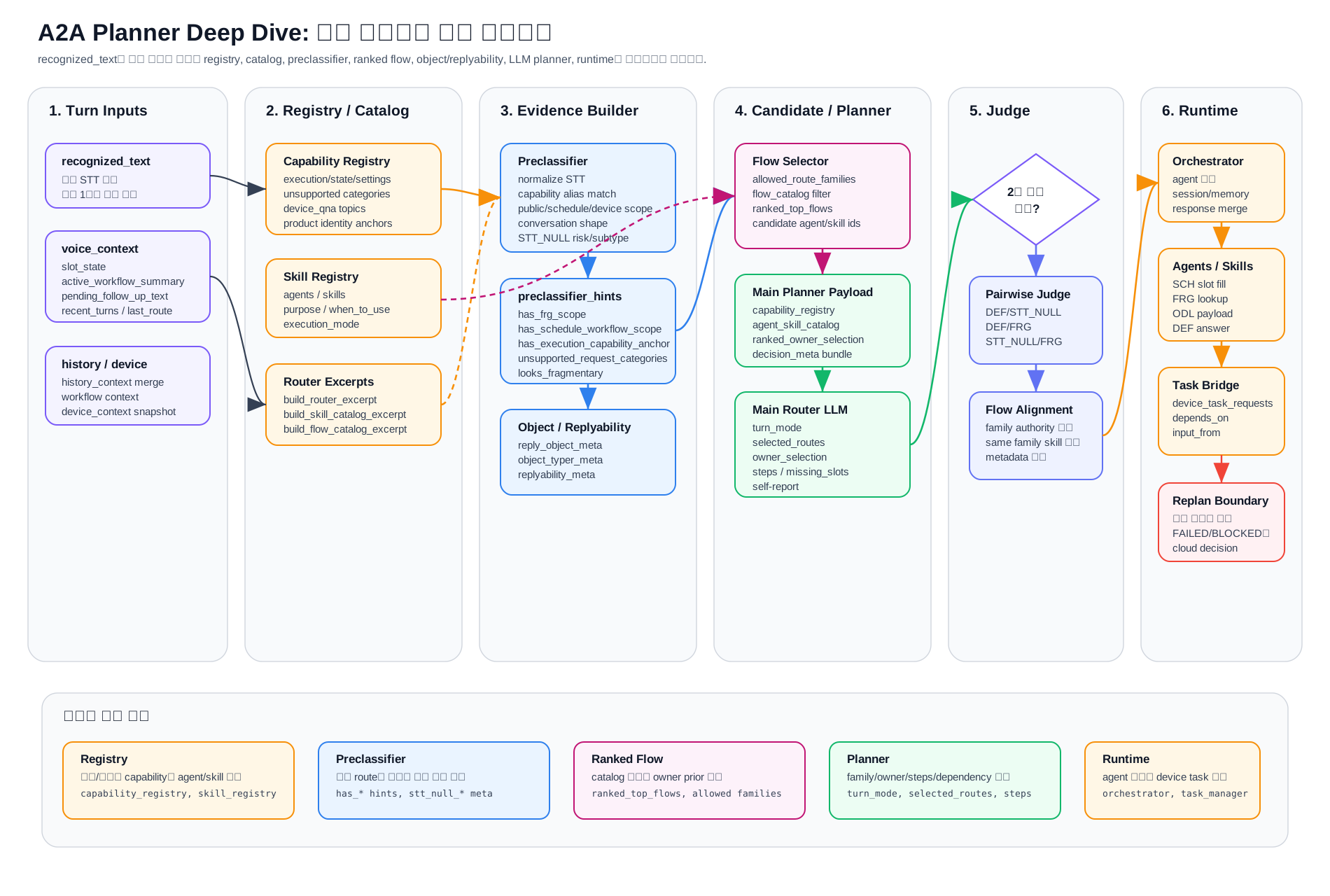
0. 빠른 이해
이 문서를 처음 보는 사람에게는 아래 한 문장으로 시작하면 된다.
Planner는 사용자 말을 바로 Agent에 던지는 장치가 아니라, “무슨 일인지 판단하고, 어떤 Agent가 어떤 순서로 처리할지 계획하며, 애매하면 한 번 더 확인하고, 실행 중 문제가 생기면 다시 계획하는 감독관”이다.
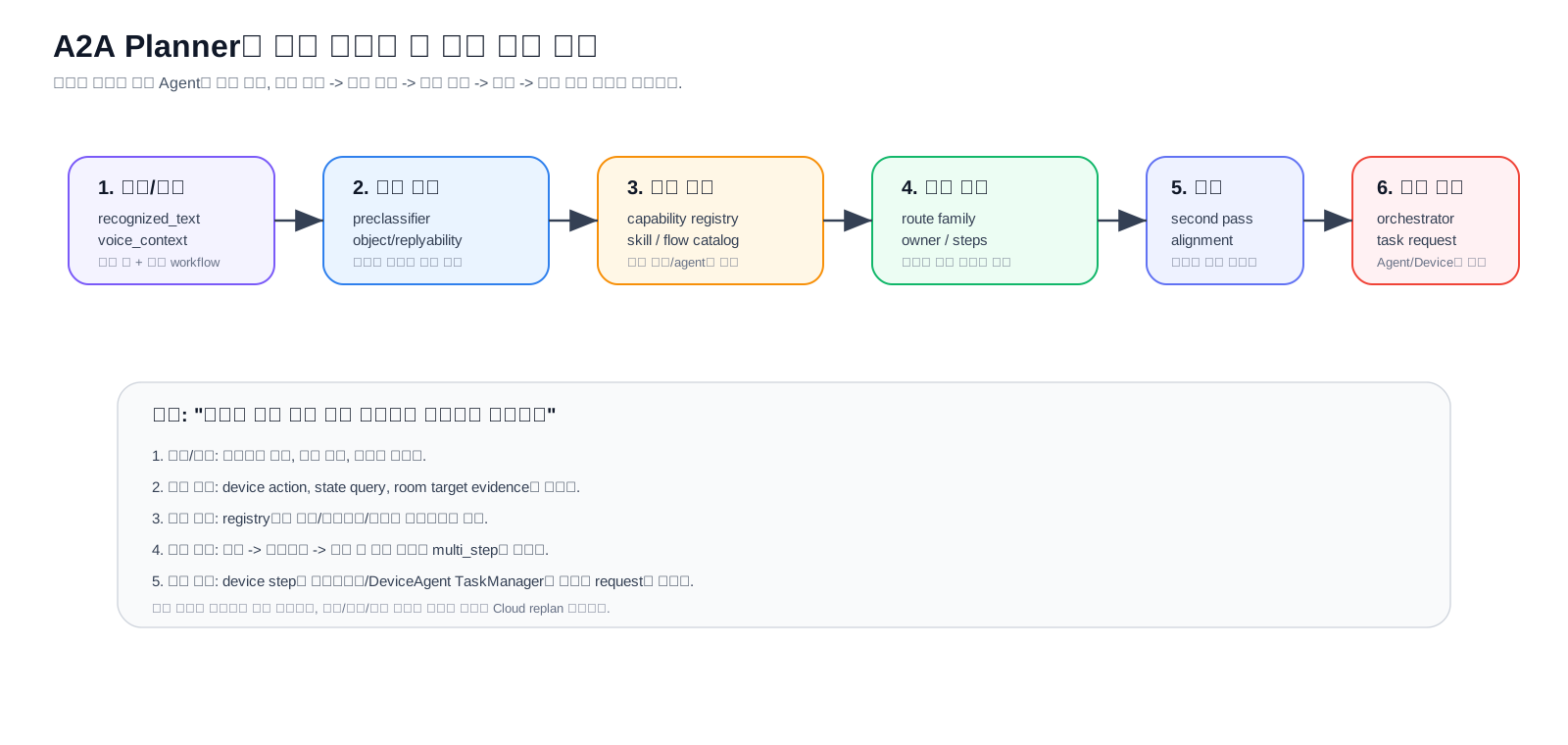
0.1 가장 쉬운 비유
식당 주문으로 비유하면 다음과 같다.
| A2A 구성 | 식당 비유 | 실제 역할 |
|---|---|---|
recognized_text |
손님이 말한 주문 | 현재 사용자 발화 |
preclassifier |
주문에서 “음료/식사/포장/알레르기” 표시하는 직원 | 판단 증거 플래그 생성 |
catalog/registry |
가능한 메뉴판과 조리 가능 장비 | 지원 기능, Agent/Skill 목록 |
planner |
주문을 주방/바/계산대로 나누는 매니저 | route family와 step 계획 생성 |
second pass |
애매한 주문을 매니저가 다시 확인 | DEF/STT_NULL/FRG 회색지대 재판단 |
runtime/orchestrator |
주방에 실제 조리 지시를 보내는 시스템 | Agent 실행과 device task 변환 |
workflow_context |
아직 끝나지 않은 주문표 | 멀티턴/복합 task 상태 저장 |
0.2 한 발화가 지나가는 쉬운 흐름
예시 발화:
거실로 가서 공기 상태 확인하고 필요하면 청정해줘
사람에게 설명할 때는 아래 순서로 말하면 된다.
- 먼저 발화에서
거실,공기 상태,청정해줘같은 증거를 찾는다. - 우리 기기가 실제로 이동/상태조회/청정을 지원하는지 registry에서 확인한다.
- planner가 “이건 ODL device 작업이고 순서가 있다”고 판단한다.
move -> state check -> clean if needed같은 step plan을 만든다.- runtime이 device step을 온디바이스가 실행 가능한 task request로 바꾼다.
- 정상 진행은 기기에서 계속 처리하고, 실패/차단/추가 판단이 필요할 때만 Cloud가 다시 개입한다.
0.3 처음 읽는 사람에게 먼저 보여줄 5개 질문
| 질문 | 보면 되는 장 |
|---|---|
| 입력으로 뭐가 들어오나? | 3. 입력 레이어 |
| 증거 플래그는 누가 만드나? | 5. Preclassifier 생성 과정 |
| Agent 후보는 어떻게 좁히나? | 6. Candidate Pool과 Ranked Flow |
| 최종 계획은 누가 만드나? | 9. Main Planner LLM |
| 실행 중 막히면 어떻게 하나? | 12. Multi-step Plan과 Task Orchestration, 18. 남은 정리 과제 |
1. Planner의 실제 역할
1.1 설명용 예시
예시 발화:
오늘 실내 공기 상태 확인하고, 나쁘면 청정해줘
이 발화에서 planner가 하는 일은 “ODL 하나 선택”이 아니다. 먼저 실내 공기 상태 확인은 상태 조회 step이고, 나쁘면 청정은 앞 결과에 의존하는 실행 step이라는 구조를 만든다. 그래서 planner는 단순 selector가 아니라 “조건과 순서를 가진 작업 계획자”로 봐야 한다.
Planner는 단순히 ODL, SCH, DEF 같은 family 하나를 고르는 selector가 아니다. 현재 구현에서는 아래 일을 한 번에 수행한다.
- 현재 발화와
voice_context를 합쳐 이번 턴의 주 owner를 고른다. - active schedule/device workflow가 있으면 새 route 판단보다 continuation/cancel/replan 판단을 우선한다.
- capability registry와 skill registry를 참고해서 가능한 agent/skill 후보군을 제한한다.
- LLM planner가
turn_mode,selected_routes,owner_selection,steps,missing_slots, STT_NULL metadata를 만든다. - 애매한
DEF/STT_NULL/FRG경계는 2차 pairwise judge로 좁게 재판단할 수 있다. - multi-step plan이면 runtime이 agent 실행 결과를 모으고, device step은
device_task_requests로 변환한다.
2. 주요 소스
2.1 소스 읽는 순서 예시
처음 소스를 보는 사람은 모든 파일을 동시에 보면 어렵다. 아래 순서가 가장 덜 헷갈린다.
main_router_api.py에서route_turn(...)의 큰 흐름을 본다.preclassifier.py에서 어떤 evidence가 만들어지는지 본다.main_router.system_prompt.txt에서 LLM에게 어떤 판단 기준을 주는지 본다.orchestrator.py와task_manager.py에서 planner 결과가 실제 실행 payload로 바뀌는 부분을 본다.
| 영역 | 파일 | 역할 |
|---|---|---|
| Planner entry | gemini/a2a/planner/main_router_api.py |
route_turn(...), 후보군 구성, LLM planner 호출, 2차 judge, ranked flow 보정 |
| Evidence layer | gemini/a2a/planner/preclassifier.py |
발화에서 capability/public/schedule/conversation/STT_NULL 증거 플래그 생성 |
| Main prompt | gemini/a2a/planner/assets/main_router.system_prompt.txt |
family, turn mode, steps 판단 기준 |
| Main schema | gemini/a2a/planner/assets/main_router.response_schema.json |
planner output JSON 계약 |
| Reply object typer | reply_object_typer.system_prompt.txt |
첫 useful reply의 대상 타입 판단 |
| Replyability judge | replyability_judge.system_prompt.txt |
지금 bounded reply가 가능한지 판단 |
| Second pass judge | second_pass_family_judge.system_prompt.txt |
DEF/STT_NULL/FRG 회색지대 pairwise 판단 |
| Ranked flow | gemini/a2a/planner/flow_selection_core.py |
catalog 기반 flow 후보와 allowed family prior 생성 |
| Runtime | gemini/a2a/runtime/orchestrator.py |
planner result를 agent execution/session_state/orchestration payload로 변환 |
| Task manager bridge | gemini/a2a/runtime/task_manager.py |
planner step을 device_task_requests로 변환 |
3. 입력 레이어
3.0 입력 레이어 예시
예시 발화:
매일 오후 6시에 고정청정 예약해줘
planner에는 단순히 이 문장만 들어가지 않는다. 대략 아래 묶음이 같이 들어간다.
{
  "recognized_text": "매일 오후 6시에 고정청정 예약해줘",
  "voice_context": {"last_route": "", "slot_state": {}},
  "capability_registry": "고정청정이 schedulable capability인지 알려주는 정보",
  "skill_registry": "SCH agent와 schedule skill 목록",
  "preclassifier_hints": "schedule scope와 time semantics evidence"
}
그래서 같은 오후 6시라도 active schedule workflow 안에서는 slot 답변이고, 단독 발화에서는 STT_NULL이나 DEF에 가까울 수 있다.
Planner 입력은 단일 텍스트가 아니라 여러 context 묶음이다.
recognized_text
voice_context
history_context
workflow_context
device_context
capability_registry
skill_registry
preclassifier_hints
ranked_top_flows
중요한 원칙은 현재 발화가 1순위라는 점이다. history와 memory는 continuation, slot filling, correction, cancel, replan 판단에 쓰는 보조 증거다.
3.1 Registry와 Catalog가 제공하는 정보
Planner 앞단에는 두 종류의 정적/준정적 지식이 들어온다. 이 정보들은 LLM이 임의로 agent나 skill을 만들지 못하게 하는 경계 역할을 한다.
| 입력 | 생성 위치 | Planner에 주는 정보 | 영향 |
|---|---|---|---|
capability_registry |
gemini/a2a/registry/capability_registry*.json |
지원 실행 capability, 상태 조회 capability, 설정 capability, 미지원 category, device Q&A topic, product identity anchor, classification hint | ODL/DQR/UNS/SCH 가능성, unsupported 판단, preclassifier anchor 생성 |
skill_registry |
gemini/a2a/registry/skill_registry.json |
agent, skill, purpose, when_to_use, when_not_to_use, execution_mode | selected_agent/selected_skill/flow_id 후보 제한 |
agent_skill_catalog |
registry.loader.build_skill_catalog_excerpt(...) |
planner prompt에 들어가는 compact agent/skill 설명 | family 결정 이후 owner/skill 정렬 |
flow_catalog |
registry.loader.build_flow_catalog_excerpt(...) |
route_family.agent_id.skill_id 형태의 flow 후보 |
ranked selector와 main planner의 flow 선택 표면 |
핵심은 registry가 family를 직접 선택하지 않는다는 점이다. Registry는 아래 질문에 답하는 자료다.
이 발화가 우리 기기에서 실행 가능한가?
현재 상태 조회인가, 설정 변경인가, 제품 지식 질문인가?
명확히 미지원인 실행 요청인가?
선택 가능한 agent/skill/flow id는 무엇인가?
3.2 Catalog 후보가 만들어지는 구조
Catalog 후보는 LLM이 상상해서 만드는 것이 아니라 skill_registry.json에 등록된 agent/skill을 코드가 펼쳐서 만든다. 흐름은 아래처럼 보면 된다.
skill_registry.json
  -> load_skill_registry()
  -> build_flow_catalog_excerpt(...)
  -> flow_catalog.flows[]
  -> _flow_catalog(preclassifier_hints)
  -> allowed_route_families 기준 필터링
  -> ranked_top_flows 또는 candidate_agent_ids/candidate_skill_ids
  -> main planner prompt 입력
3.2.1 원본: skill registry
skill_registry는 “우리 시스템에 존재하는 agent와 skill 목록”이다. 예를 들어 구조는 아래 개념이다.
{
  "agents": [
    {
      "agent_id": "SCH",
      "route_family": "SCH",
      "purpose": "schedule workflow 처리",
      "skills": [
        {
          "skill_id": "schedule_reminder_create",
          "purpose": "스케줄 등록",
          "when_to_use": ["알람/타이머/예약/스케줄 등록"],
          "required_capabilities": ["schedule_register"],
          "execution_mode": "workflow"
        }
      ]
    }
  ]
}
여기서 중요한 점은 skill_registry가 판단 결과가 아니라 “선택 가능한 메뉴판”이라는 점이다. Planner는 이 메뉴판 밖의 agent/skill을 만들면 안 된다.
3.2.2 펼치기: flow catalog 생성
registry.loader.build_flow_catalog_excerpt(...)는 agent와 skill을 하나씩 조합해서 planner가 고르기 쉬운 flow 단위로 펼친다.
Flow id는 아래처럼 만들어진다.
{route_family}.{agent_id}.{skill_id}
예: SCH.SCH.schedule_reminder_create
예: ODL.ODL.device_execution_bridge
예: FRG.FRG.freshness_answer_composition
실제 각 flow에 들어가는 값은 아래다.
flow_id
route_family
agent_id
skill_id
agent_description / agent_purpose
agent_when_to_use / agent_when_not_to_use
skill_description / skill_purpose
skill_when_to_use / skill_when_not_to_use
required_capabilities
execution_mode
즉 flow는 “이 family에서, 이 agent가, 이 skill로, 어떤 조건에서 일을 할 수 있다”는 실행 후보 단위다.
3.2.3 줄이기: 이번 발화에서 가능한 flow만 남김
모든 flow를 planner에게 다 주면 후보가 너무 넓어진다. 그래서 flow_selection_core._flow_catalog(preclassifier_hints)가 먼저 allowed_route_families를 만든 뒤, 그 family에 속한 flow만 남긴다.
예시 발화:
매일 오후 6시에 고정청정 예약해줘
가능한 내부 흐름:
preclassifier_hints:
  has_schedule_workflow_scope = true
  has_schedule_management_anchor = true
  has_schedule_time_semantics = true

_policy_route_families(...):
  allowed_route_families = [SCH]

build_flow_catalog_excerpt(..., allowed_route_families=[SCH]):
  flow_catalog.flows = [SCH.SCH.schedule_reminder_create, SCH.SCH.schedule_alarm_create, ...]
다른 예시:
요즘 볼만한 영화 추천해줘
preclassifier_hints:
  has_public_recommendation_cue = true
  has_frg_scope = true
  has_coherent_conversation_purpose = true

_policy_route_families(...):
  allowed_route_families = [FRG, DEF]

build_flow_catalog_excerpt(..., allowed_route_families=[FRG, DEF]):
  flow_catalog.flows = [FRG.FRG.freshness_answer_composition, DEF.DEF.default_conversation, ...]
3.2.4 정렬하기: route priority와 ranked flow
_flow_catalog(...)는 allowed family가 2개 이상이면 _route_priority_for_hints(...)로 flow 순서를 조정한다. 이 정렬은 최종 선택이 아니라 “planner가 먼저 볼 후보 순서”다.
그 다음 _select_router_flow_context(...)에서 두 경로 중 하나를 탄다.
A2A_INLINE_UNIFIED_ROUTER=true 기본값
  -> _heuristic_ranked_flow_result(...)
  -> inline_flow_catalog 기반 top_flows 생성

A2A_INLINE_UNIFIED_ROUTER=false
  -> select_ranked_flows(...)
  -> 별도 ranked flow selector LLM 호출 가능
따라서 ranked flow는 항상 main planner보다 앞에 있는 후보 정리 단계다. 여기서 나온 top_flows는 main planner의 prior로 들어가지만, 최종 authority는 main planner에 남아 있다.
3.2.5 최종 전달: planner가 받는 후보 묶음
결국 planner prompt에는 아래 정보가 같이 들어간다.
agent_skill_catalog:
  전체 또는 필터된 agent/skill 설명

flow_catalog / ranked_top_flows:
  이번 발화에서 우선 검토할 flow 후보

candidate_agent_ids:
  이번 턴에서 열어둔 agent id 목록

candidate_skill_ids:
  candidate agent들이 사용할 수 있는 skill id 목록

ranked_owner_selection:
  ranked flow 기준 1순위 owner 후보
이 구조의 역할 분담은 아래처럼 정리된다.
| 단계 | 하는 일 | 하지 않는 일 |
|---|---|---|
skill_registry |
가능한 agent/skill 원본 정의 | 현재 발화 판단 안 함 |
build_flow_catalog_excerpt |
agent-skill을 flow 후보로 펼침 | 후보 우선순위 판단 안 함 |
_policy_route_families |
preclassifier evidence로 열어둘 family 결정 | 최종 family 확정 안 함 |
_flow_catalog |
allowed family의 flow만 남기고 정렬 | LLM 의미 판단 안 함 |
ranked_top_flows |
main planner prior 제공 | planner 결정을 강제하지 않음 |
main planner |
최종 family/owner/step 선택 | registry 밖 agent/skill 생성하면 안 됨 |
그래서 catalog 후보 생성은 “LLM이 agent를 고르는 일”이 아니라, LLM이 고를 수 있는 안전한 선택지를 코드가 먼저 만들어주는 과정이다.
3.3 Capability Registry가 Preclassifier에 주는 축
build_router_excerpt(...)는 capability registry를 planner용 excerpt로 줄인다. v2 registry 기준 핵심 축은 아래다.
supported_capabilities
execution_capabilities
state_query_capabilities
settings_capabilities
unsupported_request_categories
device_qna_topics
product_identity_anchors
classification_hints
router_hints
Preclassifier는 이 excerpt를 사용해 execution_matches, state_query_matches, settings_matches, unsupported_matches, device_qna_topics 매칭을 만든다. 따라서 단순히 문장 표면만 보는 것이 아니라 “우리 제품/기기에서 지원되는 기능 목록”과 비교해 증거를 만든다.
4. 판단 파이프라인
4.1 파이프라인을 쉽게 읽는 방법
17단계로 보면 복잡하지만, 사람에게 설명할 때는 4단계로 줄이면 된다.
| 큰 단계 | 실제 내부 단계 | 한 줄 설명 |
|---|---|---|
| 증거 만들기 | 1~8 | 발화, context, registry에서 판단 재료를 만든다. |
| 후보 좁히기 | 9~11 | 가능한 agent/skill과 workflow continuation을 추린다. |
| 계획 만들기 | 12 | LLM planner가 family, owner, step을 만든다. |
| 보정/실행 연결 | 13~17 | 애매한 경우 재판단하고 runtime이 실행 가능한 형태로 넘긴다. |
예시로 드래곤 길들이기는 1차에서 DEF/STT_NULL/FRG가 흔들릴 수 있고, 13~14단계 second pass에서 public title인지 다시 본다.
현재 route_turn(...)의 큰 순서는 아래와 같다.
recognized_text와voice_context정규화- history context merge
- ranked flow context 선택
- preclassifier hints 생성
- reply object meta 생성
- 필요 시 LLM object typer 실행
- replyability meta 생성
- 필요 시 LLM replyability judge 실행
- candidate agent/skill pool 결정
- active schedule workflow short-circuit 확인
- 특수 shortcut 또는 heuristic-only mode 처리
- main planner LLM 호출
- second pass 필요 여부 판단
- second pass family judge 실행
- ranked flow center 보정
- replan escape policy 적용
- decision metadata, usage metrics 부착
4.1.1 각 챕터를 읽는 공통 포맷
이 문서의 각 레이어는 아래 5개 질문으로 읽으면 된다. 이 포맷을 유지해야 “개념 설명”이 아니라 실제 구현 흐름으로 이해할 수 있다.
| 질문 | 확인할 내용 | 예시 |
|---|---|---|
| 입력은 무엇인가 | 이전 단계에서 받은 dict/list/string | recognized_text, preclassifier_hints, flow_catalog |
| 누가 처리하는가 | 실제 함수 또는 prompt | _policy_route_families(...), route_turn(...), main planner prompt |
| 어떤 기준으로 바꾸는가 | alias match, flag 조합, LLM prompt 판단, workflow state | capability alias, unsupported category, runner-up pair |
| 출력은 무엇인가 | 다음 단계로 넘어가는 구조화 값 | allowed_route_families, reply_object_meta, steps |
| 다음 단계에 어떤 영향을 주는가 | 후보 제한, prior 제공, dispatch 결정, replan 판단 | candidate pool 제한, second pass 개방, device task 생성 |
예를 들어 preclassifier 장은 아래처럼 읽어야 한다.
입력: recognized_text + capability_registry_excerpt + voice_context
처리: build_preclassifier_hints(...)
기준: alias/category/surface cue/context state 매칭
출력: has_frg_scope, has_schedule_workflow_scope, unsupported_request_categories ...
영향: allowed_route_families, candidate_agent_ids, reply_object_meta, second_pass_strategy
main planner 장은 아래처럼 읽는다.
입력: 원문 발화 + evidence packet + catalog/ranked_top_flows + workflow_context
처리: Gemini main planner LLM + response_schema
기준: dominant first-response direction, family policy, candidate flow contract
출력: selected_routes, selected_agent, selected_skill, steps, missing_slots
영향: runtime dispatch, multi-turn 유지, task orchestration 시작
이 포맷을 기준으로 보면, 어느 단계가 deterministic code이고 어느 단계가 LLM 판단인지 분리해서 볼 수 있다.
4.2 LLM 없이 앞단 판단이 가능한 이유
여기서 중요한 점은 1~8단계가 최종 family를 고르는 단계가 아니라는 것이다. 이 단계들은 대부분 “판단”이라기보다 증거 생성, 후보 정리, 위험 신호 표시에 가깝다.
즉 LLM이 없어도 아래 작업은 코드로 가능하다.
| 단계 | 기본 LLM 여부 | 어떻게 동작하는가 | 산출물의 의미 |
|---|---|---|---|
recognized_text 정규화 |
아니오 | 문자열 trim, 공백/기호/표면형 정리 | 같은 발화를 일관된 형태로 본다. |
voice_context merge |
아니오 | 이전 turn, active workflow, slot_state를 dict로 병합 | 지금 발화가 새 요청인지 continuation인지 볼 재료를 만든다. |
| ranked flow context | 보통 아니오, 설정에 따라 가능 | 기본은 inline catalog/ranking. A2A_INLINE_UNIFIED_ROUTER=false면 ranked flow selector LLM 경로 가능 |
후보 flow와 owner 후보를 좁힌다. |
| preclassifier hints | 아니오 | capability registry, unsupported category, 문장 표면 cue, workflow state를 코드로 매칭 | has_frg_scope, has_schedule_workflow_scope 같은 boolean evidence를 만든다. |
| reply object meta | 아니오 | preclassifier flag 조합을 if/elif로 object type에 매핑 | 첫 useful reply의 대상이 device/public/conversation/unknown 중 어디에 가까운지 표시한다. |
| LLM object typer | 기본 아니오 | A2A_OBJECT_TYPER_MODE=llm일 때만 LLM으로 object type을 재판단 |
object meta 보조 judge다. 기본값은 disabled다. |
| replyability meta | 아니오 | conversation/STT_NULL 관련 flag를 보고 bounded reply 가능성을 계산 | 지금 바로 좁은 답변이 가능한지, whole-intent repair가 필요한지 표시한다. |
| LLM replyability judge | 기본 아니오 | A2A_REPLYABILITY_JUDGE_MODE=llm일 때만 LLM 호출 |
replyability 보조 judge다. 기본값은 disabled다. |
그래서 이 구간의 출력은 “LLM이 의미를 이해해서 정답을 낸 결과”가 아니다. 더 정확히는 main planner LLM이 과추론하지 않도록 입력을 구조화한 evidence packet이다.
예시로 유튜브 틀어줘가 들어오면 LLM 없이도 아래는 만들 수 있다.
recognized_text: 유튜브 틀어줘
preclassifier_hints.unsupported_request_categories: [streaming_or_app_execution]
preclassifier_hints.has_execution_capability_anchor: false
reply_object_meta.object_type: unsupported_execution_target
replyability_meta.replyability_type: uncertain
candidate route bias: UNS 쪽으로 강함
이 단계가 UNS를 최종 확정하는 것은 아니다. 다만 “명령형이니 ODL”로 잘못 가는 것을 막기 위해, main planner LLM에 지원 불가 실행 요청일 가능성이 높다는 구조화된 증거를 넘긴다. 최종 family 선택은 뒤의 main planner LLM, 필요 시 second pass judge에서 이루어진다.
반대로 매일 오후 6시에 고정청정 예약해줘는 LLM 없이도 아래 증거를 만들 수 있다.
시간/반복 표현: 있음
스케줄 관리 cue: 있음
지원 가능한 schedule workflow 후보: 있음
reply_object_meta.object_type: workflow_target
candidate route bias: SCH 쪽으로 강함
이것도 SCH를 코드가 최종 확정한다는 뜻은 아니다. 스케줄로 볼 충분한 근거가 있다는 형태로 planner에게 전달하는 것이다.
정리하면 현재 구조는 아래처럼 봐야 한다.
앞단 deterministic layer
  = 문자열/상태/registry 기반 evidence 생성
  = 후보 family와 agent pool 제한
  = LLM 입력 품질 개선

main planner LLM
  = evidence를 보고 dominant first-response direction 선택
  = selected_routes, selected_agent, selected_skill, steps 생성

second pass LLM
  = DEF/STT_NULL/FRG 같은 회색지대만 좁게 재판단
따라서 앞단이 LLM 없이 동작할 수 있는 이유는, 그 단계들이 “의미 전체를 창의적으로 해석”하는 게 아니라 이미 정의된 registry, capability, unsupported category, workflow state, 표면 cue를 이용해 판단 재료를 만드는 역할이기 때문이다.
5. Preclassifier 생성 과정
5.0 Preclassifier를 쉽게 말하면
Preclassifier는 “정답을 고르는 모델”이 아니라 “형광펜을 치는 단계”다.
예시 발화:
유튜브 틀어줘
여기서 preclassifier는 아래처럼 표시한다.
실행 말투 있음: true
지원되는 기기 capability anchor: false
unsupported category: streaming_or_app_execution
이 표시 덕분에 planner는 명령형이라는 이유만으로 ODL을 고르지 않고 UNS로 보낼 수 있다.
Preclassifier는 family를 최종 결정하지 않는다. 다만 LLM planner가 과추론하지 않도록 증거와 위험 신호를 구조화한다. 실제 생성 함수는 build_preclassifier_hints(recognized_text, capability_registry_excerpt, voice_context)다.
5.1 입력 정규화
먼저 STT text를 normalize한다.
recognized_text -> lowercase/공백/기호 정리 -> normalized_text
voice_context -> history_hint_strength, slot_state, active_workflow_summary, pending_follow_up_text 읽기
capability_registry_excerpt -> supported/unsupported/device_qna/classification_hints 읽기
이 단계에서 history는 발화를 덮어쓰기 위한 것이 아니라, schedule slot fragment나 follow-up fragment가 실제 continuation인지 보는 보조 증거다.
5.2 Registry 기반 anchor 매칭
Preclassifier는 registry excerpt에서 아래 capability 매치를 만든다.
execution_matches = execution_capabilities alias/function match
state_query_matches = state_query_capabilities alias/function match
settings_matches = settings_capabilities alias/function match
unsupported_matches = unsupported_request_categories alias match
device_qna_topics = device/product Q&A topic match
product_identity_anchors = 제품/assistant identity anchor match
이 매칭에서 파생되는 대표 hint는 아래다.
has_execution_capability_anchor
has_state_query_capability_anchor
has_settings_capability_anchor
has_supported_capability_anchor
unsupported_request_categories
has_stable_device_qna_target
has_product_identity_anchor
즉 켜줘 같은 표면 명령만으로 ODL을 만드는 것이 아니라, registry에 있는 실행/상태/설정 capability와 결합되는지를 본다.
5.3 Domain scope hint 생성
그 다음 발화를 여러 domain scope로 분해한다.
| scope | 대표 hint | 의미 |
|---|---|---|
| device execution/state | has_explicit_odl_intent, has_device_action_cue_surface, has_actionable_device_fragment_surface |
현재 기기 실행/상태/설정 가능성 |
| schedule/workflow | has_schedule_workflow_scope, has_schedule_management_anchor, has_contextual_schedule_slot_fragment |
예약/알람/타이머/스케줄 slot filling 가능성 |
| device Q&A | has_dqr_scope, has_howto_or_explanation_cue, has_stable_device_qna_target |
실행이 아니라 제품 설명/사용법 가능성 |
| public/external | has_frg_scope, has_explicit_public_target, has_public_recommendation_cue, has_general_public_lookup_cue |
외부 정보/추천/검색 가능성 |
| conversation | has_coherent_conversation_purpose, has_clear_conversation_reply_shape, has_meta_request_cue, has_style_or_format_request_cue |
DEF 가능한 일반 대화 목적 |
| STT_NULL risk | looks_fragmentary, has_no_dominant_interpretation, stt_null_* |
발화 붕괴/anchor 없음/복구 위험 |
| unsupported | unsupported_request_categories |
지원 불가 실행 category |
5.3.1 주요 Evidence 한 줄 설명
아래 evidence는 planner에게 “정답”을 주는 값이 아니라, 어느 family가 살아 있는지와 어디가 위험한지를 알려주는 신호다.
| Evidence | 한 줄 설명 | 주 영향 영역 |
|---|---|---|
normalized_text |
STT 발화를 비교 가능한 형태로 정리한 텍스트다. | 모든 판단 |
execution_matches |
registry의 실행 capability alias/function과 발화가 매칭된 결과다. | ODL, UNS |
state_query_matches |
현재 상태 조회 capability와 발화가 매칭된 결과다. | ODL, DQR |
settings_matches |
설정 변경/토글 capability와 발화가 매칭된 결과다. | ODL, DQR |
has_execution_capability_anchor |
실제 지원 실행 기능에 닿는 anchor가 있다는 뜻이다. | ODL |
has_state_query_capability_anchor |
현재값/상태를 물을 수 있는 지원 기능 anchor가 있다는 뜻이다. | ODL |
has_settings_capability_anchor |
설정/모드 변경과 연결되는 지원 기능 anchor가 있다는 뜻이다. | ODL, DQR |
has_device_action_cue_surface |
표면 문장에 실행/제어형 말투가 있다는 뜻이다. | ODL, UNS |
has_actionable_device_fragment_surface |
짧거나 불완전해도 기기 실행 fragment로 복구 가능한 표면이 있다는 뜻이다. | ODL, STT_NULL |
has_odl_proposal_eligible_surface |
바로 실행 대신 “제안/확인형 ODL”로 해석 가능한 device fragment다. | ODL |
has_schedule_management_anchor |
알람/타이머/예약/스케줄 관리 anchor가 있다는 뜻이다. | SCH |
has_schedule_workflow_scope |
발화가 schedule workflow 소유로 이어질 수 있다는 뜻이다. | SCH |
has_contextual_schedule_slot_fragment |
active SCH workflow 안에서 다음 slot 답변처럼 보이는 fragment다. | SCH continuation |
has_dqr_scope |
제품/기기 설명, 사용법, 문제해결 쪽으로 답해야 할 scope가 있다는 뜻이다. | DQR |
has_howto_or_explanation_cue |
“어떻게/왜/무슨 기능”처럼 설명형 답변을 요구하는 cue다. | DQR, DEF |
has_stable_device_qna_target |
device Q&A topic으로 안정적으로 연결되는 대상이 있다는 뜻이다. | DQR |
has_frg_scope |
외부/public 정보 조회나 추천으로 이어질 수 있는 scope가 있다는 뜻이다. | FRG |
has_explicit_public_target |
사람/장소/브랜드/콘텐츠/시장 등 public target이 명시적으로 살아 있다는 뜻이다. | FRG |
has_public_recommendation_cue |
맛집/영화/장소 등 public catalog 추천 의도가 있다는 뜻이다. | FRG |
has_general_public_lookup_cue |
검색/조회/식별/랭킹처럼 외부 지식 조회 방향이 있다는 뜻이다. | FRG |
has_public_weather_request |
날씨 자체 조회처럼 외부/current public 정보가 필요한 요청이다. | FRG |
has_coherent_conversation_purpose |
일반 대화로 자연스럽게 응답할 목적이 살아 있다는 뜻이다. | DEF |
has_clear_conversation_reply_shape |
즉시 한 문장 이상의 bounded reply를 시작할 수 있는 형태다. | DEF, STT_NULL |
has_meta_request_cue |
답변 방식, 도와달라, 말해달라 같은 meta/help 요청 cue다. | DEF |
has_style_or_format_request_cue |
말투/형식/문체 조정 요청이다. | DEF |
looks_fragmentary |
발화가 잘렸거나 독립 의미가 약한 fragment처럼 보인다는 뜻이다. | STT_NULL |
has_no_dominant_interpretation |
여러 해석이 아니라 사실상 우세 해석이 없다는 뜻이다. | STT_NULL |
stt_null_target_scope |
STT_NULL이어도 남아 있는 약한 scope가 device/public/workflow/conversation 중 무엇인지 표시한다. | STT_NULL subtype |
stt_null_recoverability |
재질문으로 복구 가능성이 어느 정도인지 표시한다. | STT_NULL subtype |
stt_null_over_inference_risk |
억지 해석으로 잘못 라우팅할 위험이 높은지 표시한다. | STT_NULL subtype |
unsupported_request_categories |
지원 불가 실행 category에 매칭된 항목 목록이다. | UNS |
읽는 방법은 단순하다. 예를 들어 has_device_action_cue_surface=true만으로는 ODL을 확정하지 않고, has_execution_capability_anchor 또는 has_state_query_capability_anchor 같은 registry 기반 anchor와 같이 봐야 한다. 반대로 has_public_recommendation_cue=true인데 object가 conversation으로 읽히면 DEF와 FRG가 경쟁하므로 2차 판단 후보가 된다.
5.4 Preclassifier는 의미 이해가 아니라 축별 증거 생성이다
우리가 튜닝 중에 “축”이라고 부른 것은 route family 자체가 아니라, 발화를 어느 방향으로 읽을 수 있는지 나타내는 evidence axis다. Preclassifier는 자연어 전체 의미를 연관 추론하지 않는다. 대신 정규화된 발화에서 이미 정의된 alias, category, surface cue, active workflow state가 살아 있는지 확인해 각 축의 신호를 만든다.
| 축 | 확인하는 대표 신호 | 강해지는 family | 약할 때의 처리 |
|---|---|---|---|
| 실행/상태/설정 축 | capability registry alias, “켜줘/꺼줘/확인해줘/설정해줘” | ODL | 실행 말투만 있으면 ODL 확정 금지 |
| 미지원 실행 축 | YouTube/음악/영상/전화/외부앱 등 unsupported category | UNS | 실행 말투가 있어도 supported anchor가 없으면 UNS 후보 |
| 스케줄 축 | 알람/타이머/예약/반복/등록/취소/slot fragment | SCH | 시간 단어만 있으면 SCH 확정 금지 |
| 제품 지식 축 | 사용법/설명/고장/기능/제품 identity/topic | DQR | public entity면 DQR 확정 금지 |
| 외부 정보 축 | 사람/장소/브랜드/콘텐츠/날씨/랭킹/추천/검색 | FRG | public target이 약하면 DEF/STT_NULL과 경쟁 |
| 대화 가능 축 | 감사/거절/감정/의견/말투/도움/짧은 응답 shape | DEF | 목적이 약하면 STT_NULL과 경쟁 |
| 파편/복구 축 | 잘린 말, completion tail, no dominant interpretation | STT_NULL | 약한 scope가 있으면 SOFT/GENERIC으로 보류 |
예를 들어 아래 발화는 단어 포함과 registry 매칭만으로도 축이 만들어진다.
청정 시작해줘
실행/상태/설정 축:
  청정 -> execution capability alias 매칭
  시작해줘 -> action cue 매칭
  has_execution_capability_anchor = true
  has_device_action_cue_surface = true
  ODL 후보 강화
반대로 아래 발화는 실행 말투가 있어도 다른 축이 더 강하다.
유튜브 틀어줘
미지원 실행 축:
  유튜브 -> unsupported_request_categories 매칭
  틀어줘 -> action cue 매칭
  supported execution capability anchor = false
  UNS 후보 강화
  ODL 과추론 방지
또 아래처럼 cue가 약하거나 불완전한 발화는 preclassifier가 억지로 의미를 만들지 않는다.
변화의 시작
높은 장게
드래곤 길들이기
강한 device/schedule/unsupported anchor 없음
public title 또는 conversation 가능성만 약하게 남을 수 있음
reply_object_meta = unknown 또는 conversation
replyability_meta = uncertain
main planner 또는 second pass에서 의미 판단 필요
즉 preclassifier의 역할은 “모든 발화를 이해하는 것”이 아니라, 강한 단서가 있는 축은 올리고 애매한 축은 애매하다고 남기는 것이다.
5.5 축을 이동시키며 튜닝했다는 뜻
성능 튜닝에서 “축을 이동시킨다”는 말은 특정 family를 룰로 강제한다는 뜻이 아니다. 같은 발화가 planner에 들어가기 전에 어떤 evidence axis가 더 강하게 보이도록 할지, 어떤 경우에는 확정하지 말고 2차 판단으로 넘길지 조정한다는 뜻이다.
대표적인 튜닝 방식은 아래와 같다.
| 튜닝 방식 | 실제로 바꾼 것 | 기대 효과 | 위험 |
|---|---|---|---|
| ODL 축 강화 | supported capability alias, action/state/settings anchor를 더 안정적으로 살림 | 명확한 기기 실행/상태조회 누락 감소 | UNS/DEF를 ODL로 과해석할 수 있음 |
| ODL 축 제한 | action cue만 있고 supported device anchor가 없으면 ODL 확정 금지 | “사자기 켜줘” 같은 opaque command 오분류 감소 | 짧은 기기 fragment 일부가 약해질 수 있음 |
| FRG 축 강화 | public recommendation/title/weather/lookup cue를 더 잘 살림 | 영화/장소/날씨/추천이 DEF/STT_NULL로 떨어지는 문제 감소 | 일반 대화 추천을 FRG로 과잉 이동 가능 |
| DEF 축 회복 | coherent conversation purpose, clear reply shape를 더 인정 | 자연스러운 짧은 대화가 STT_NULL로 무너지는 문제 감소 | broken STT를 DEF로 과구제할 수 있음 |
| STT_NULL 축 제한 | target/scope가 살아 있으면 HARD로 닫지 않음 | 복구 가능한 발화가 바로 실패 처리되는 문제 감소 | 정말 깨진 STT를 계속 살릴 수 있음 |
| 2차 판단 축 개방 | DEF/STT_NULL/FRG 경계에서 runner-up과 ambiguity를 보존 | 1차 과신으로 닫히는 문제 감소 | LLM 호출 증가, 일부 flip risk |
예시로 요트북 추천해줘를 보면, preclassifier가 정확한 의미를 아는 것은 아니다. 다만 추천해줘는 public recommendation 축과 DEF 대화 축을 동시에 열 수 있다. 튜닝 전에는 DEF 축으로 너무 빨리 닫히면 FRG 복구 기회를 잃었다. 그래서 튜닝 방향은 FRG로 무조건 보내기가 아니라 아래처럼 축을 조정하는 쪽이었다.
기존 나쁜 흐름:
  recommendation surface 있음
  object_type = conversation
  planner confidence = high
  selected = DEF
  second pass 없음

개선 목표:
  recommendation/public 가능성 남김
  runner_up_family = FRG 보존
  confidence = medium/low 가능
  needs_second_pass = true 가능
  second pass에서 DEF vs FRG 좁게 판단
DEF와 STT_NULL도 같은 방식이다. 변화의 시작처럼 문장형으로 보이는 발화는 DEF 축을 살릴 수 있지만, target이 없고 reply shape가 약하면 STT_NULL 축도 같이 남긴다. 튜닝은 DEF를 무조건 올리는 게 아니라, “bounded reply target이 살아 있는가”를 기준으로 DEF 축과 STT_NULL 축의 경계를 이동시키는 작업이었다.
따라서 현재 구조에서 축 튜닝은 세 단계로 이루어진다.
1. Preclassifier 축 조정
   어떤 cue/alias/category가 어떤 axis를 켤지 조정

2. Meta 축 조정
   reply_object_meta, replyability_meta가 unknown/conversation/public/device 중 어디로 기울지 조정

3. Planner/Second Pass 축 조정
   1차에서 확정할지, runner-up을 보존하고 2차로 넘길지 조정
이 방식의 장점은 hard rule로 family를 고정하지 않고, LLM planner가 볼 evidence의 방향과 강도만 제어할 수 있다는 점이다. 반대로 단점은 축 하나를 올리면 다른 family가 내려갈 수 있기 때문에, ODL/FRG/DEF/STT_NULL을 항상 함께 benchmark로 확인해야 한다는 점이다.
5.6 Active workflow 관련 hint
voice_context.slot_state.owner_route == SCH 이거나 active_workflow_summary가 sch로 시작하면 schedule continuation 판단을 위한 hint가 만들어진다.
has_contextual_schedule_slot_fragment = true
조건: active SCH workflow + missing_slots/pending question + 시간/장소/수정 fragment
이 값이 중요한 이유는 내일, 오후 6시, 거실 말고 안방 같은 발화가 단독으로는 DEF/STT_NULL처럼 보여도, active schedule workflow 안에서는 SCH slot filling으로 해석되어야 하기 때문이다.
5.7 Preclassifier 출력의 사용처
Preclassifier hint는 네 군데로 전달된다.
1. flow_selection_core._policy_route_families(...)
   -> allowed_route_families 생성

2. main_router_api._candidate_agent_ids(...)
   -> candidate_agent_ids / candidate_skill_ids fallback 생성

3. build_main_router_contents(...)
   -> main planner prompt payload에 preclassifier_hints 포함

4. reply_object_meta / replyability_meta / second_pass_strategy
   -> DEF/STT_NULL/FRG 회색지대 판단 보조
따라서 preclassifier는 “룰로 최종 route를 고르는 장치”가 아니라, LLM planner와 flow selector의 입력 공간을 안전하게 좁히는 evidence layer다.
6. Candidate Pool과 Ranked Flow
6.0 Candidate Pool 예시
예시 발화:
요즘 볼만한 영화 추천해줘
preclassifier는 public recommendation evidence를 만들고, flow selector는 FRG 관련 flow를 상위 후보로 둔다. 동시에 추천해줘는 일반 대화처럼 보일 수도 있으므로 DEF가 약한 후보로 남을 수 있다.
allowed_route_families = [FRG, DEF]
ranked_top_flows = [FRG public lookup/recommendation, DEF default conversation]
이 구조의 장점은 LLM planner가 모든 agent를 처음부터 뒤지는 게 아니라, 살아 있는 후보 안에서 의미 판단을 한다는 점이다.
Planner는 처음부터 모든 agent를 같은 확률로 열지 않는다. 후보 생성은 아래 순서로 진행된다.
1. preclassifier_hints 생성
2. _policy_route_families(preclassifier_hints)로 열어둘 family 결정
3. build_flow_catalog_excerpt(..., allowed_route_families=...)로 flow 후보 필터링
4. _flow_catalog(...)가 candidate_agent_ids/candidate_skill_ids 추출
5. _select_router_flow_context(...)가 inline 또는 LLM ranked flow를 선택
6. _resolve_candidate_pool(...)이 main planner에 넣을 최종 candidate pool 결정
6.1 Ranked Flow Selector
ranked flow selector는 main planner가 보기 전에 “이번 발화에서 어느 flow를 먼저 볼지” 정하는 단계다. 최종 route를 확정하는 단계가 아니다.
실제 호출 경로는 아래다.
route_turn(...)
  -> build_preclassifier_hints(...)
  -> _planner_top_k_for_context(...)
  -> _select_router_flow_context(...)
      -> _flow_catalog(preclassifier_hints)
          -> _policy_route_families(preclassifier_hints)
          -> build_flow_catalog_excerpt(SKILL_REGISTRY, allowed_route_families=...)
          -> candidate_agent_ids / candidate_skill_ids 추출
      -> _heuristic_ranked_flow_result(...) 또는 select_ranked_flows(...)
현재 기본 설정에서는 A2A_INLINE_UNIFIED_ROUTER=true이므로 보통 _heuristic_ranked_flow_result(...)가 사용된다. 이 경우 별도 LLM 호출 없이 catalog와 preclassifier evidence로 top_flows를 만든다. A2A_INLINE_UNIFIED_ROUTER=false이면 select_ranked_flows(...) 경로로 가며, 이때는 별도 ranked flow selector LLM을 사용할 수 있다.
입력 payload는 개념적으로 아래 구조다.
{
  "utterance": "요즘 볼만한 영화 추천해줘",
  "preclassifier_hints": {
    "has_frg_scope": true,
    "has_public_recommendation_cue": true,
    "has_coherent_conversation_purpose": true
  },
  "allowed_route_families": ["FRG", "DEF"],
  "candidate_agent_ids": ["FRG", "DEF"],
  "candidate_skill_ids": ["freshness_answer_composition", "default_conversation"],
  "flow_catalog": {
    "flows": [
      {"flow_id": "FRG.FRG.freshness_answer_composition", "route_family": "FRG"},
      {"flow_id": "DEF.DEF.default_conversation", "route_family": "DEF"}
    ]
  }
}
출력은 top_flows다.
{
  "top_flows": [
    {
      "flow_id": "FRG.FRG.freshness_answer_composition",
      "route_family": "FRG",
      "agent_id": "FRG",
      "skill_id": "freshness_answer_composition",
      "confidence": "medium",
      "rationale": "public recommendation target remains"
    },
    {
      "flow_id": "DEF.DEF.default_conversation",
      "route_family": "DEF",
      "agent_id": "DEF",
      "skill_id": "default_conversation",
      "confidence": "low",
      "rationale": "recommendation wording can also be conversational"
    }
  ],
  "candidate_agent_ids": ["FRG", "DEF"],
  "candidate_skill_ids": ["freshness_answer_composition", "default_conversation"]
}
여기서 FRG가 1순위라고 해서 최종 FRG가 확정되는 것은 아니다. main planner는 원문 발화, evidence, ranked flow, response schema를 모두 보고 최종 selected_routes를 만든다. 다만 ranked flow는 “FRG를 먼저 검토하라”는 prior 역할을 한다.
6.1.1 후보 생성 단계별 역할
| 단계 | 실제 함수 | 입력 | 출력 | 역할 |
|---|---|---|---|---|
| family gate | _policy_route_families(...) |
preclassifier_hints |
allowed_route_families |
이번 턴에 열어둘 family 후보 결정 |
| flow 펼치기 | build_flow_catalog_excerpt(...) |
skill_registry, allowed family |
flow_catalog.flows[] |
agent-skill 조합을 flow 후보로 변환 |
| flow 정렬 | _flow_catalog(...) |
preclassifier_hints |
정렬된 flow_catalog |
evidence에 맞는 family 순서 우선 |
| ranked 선택 | _heuristic_ranked_flow_result(...) 또는 select_ranked_flows(...) |
utterance, flow catalog, hints | ranked_top_flows |
main planner prior 생성 |
| candidate pool | _resolve_candidate_pool(...) |
ranked result, hints | candidate_agent_ids, candidate_skill_ids |
planner 입력 후보 확정 |
| 최종 선택 | main planner LLM | 원문, hints, catalog, candidates | selected_routes, selected_agent, steps |
실제 route/owner/plan 결정 |
6.1.2 왜 이렇게 나누는가
이 구조를 나누는 이유는 세 가지다.
1. 안전성
   LLM이 registry에 없는 agent/skill을 만들지 못하게 한다.

2. 성능
   모든 flow를 prompt에 넣지 않고 관련 후보만 넣는다.

3. 회색지대 보존
   FRG/DEF, DEF/STT_NULL처럼 애매한 후보를 둘 다 남겨 main planner 또는 second pass가 판단하게 한다.
6.1.3 Catalog / Ranked Flow 필드 한 줄 설명
Catalog 계열 값은 planner가 “없는 agent/skill/flow를 만들지 않게” 하고, family 결정 이후 실제 owner를 정렬하게 하는 계약이다.
| 항목 | 한 줄 설명 | 사용 위치 |
|---|---|---|
capability_registry |
기기가 지원하는 실행/상태/설정/스케줄/미지원 범위를 담은 기능 사전이다. | preclassifier, planner feasibility 판단 |
supported_capabilities |
planner에 노출 가능한 전체 지원 capability 요약이다. | ODL/DQR/SCH 가능성 판단 |
execution_capabilities |
실제 실행 side effect를 만들 수 있는 capability 목록이다. | ODL 후보 생성 |
state_query_capabilities |
현재 상태/센서/환경 값을 조회할 수 있는 capability 목록이다. | ODL 상태조회, DQR 경계 |
settings_capabilities |
설정/모드/토글 변경과 관련된 capability 목록이다. | ODL 설정 실행, DQR how-to 경계 |
unsupported_request_categories |
음악/영상/외부기기/전화연결 등 지원하지 않는 실행 category 목록이다. | UNS 후보 생성 |
device_qna_topics |
제품 설명/사용법/문제해결로 답할 수 있는 device Q&A topic 목록이다. | DQR 후보 생성 |
product_identity_anchors |
제품명/assistant명/브랜드성 anchor 목록이다. | DQR, ODL 과잉방지 |
classification_hints |
preclassifier가 사용하는 cue 묶음이다. | schedule/public/conversation/STT_NULL hint 생성 |
skill_registry |
route family별 agent와 skill 정의를 담은 실행 주체 사전이다. | catalog excerpt 생성 |
agent_skill_catalog |
planner prompt에 들어가는 compact agent/skill 설명이다. | selected_agent/selected_skill 선택 |
flow_catalog |
agent-skill 조합을 flow_id 단위로 펼친 후보 목록이다. |
ranked selector 입력 |
flow_id |
{route_family}.{agent_id}.{skill_id} 형태의 실행 후보 식별자다. |
selected_flow_id |
route_family |
flow가 속한 최상위 routing family다. | selected_routes, owner_selection |
agent_id |
실제 specialist agent 소유자다. | selected_agent, runtime dispatch |
skill_id |
agent 안에서 사용할 세부 skill이다. | selected_skill, agent execution |
agent_purpose |
agent가 맡는 업무 범위를 짧게 설명한다. | owner 판단 |
skill_purpose |
skill이 수행하는 구체 기능을 설명한다. | skill 판단 |
when_to_use |
이 agent/skill을 선택해야 하는 조건이다. | flow ranking, planner prompt |
when_not_to_use |
이 agent/skill을 선택하면 안 되는 조건이다. | 오분류 방지 |
required_capabilities |
해당 skill 실행에 필요한 capability 조건이다. | feasibility / fallback 판단 |
execution_mode |
cloud/device/realtime/workflow 등 실행 성격을 나타낸다. | steps.execution_target, runtime |
allowed_route_families |
preclassifier evidence로 이번 턴에 열어둔 family 후보 목록이다. | flow catalog filtering |
ranked_top_flows |
flow selector가 고른 상위 flow 후보들이다. | main planner prior |
ranked_primary_flow |
ranked_top_flows 중 1순위 flow다. |
기본 owner prior |
ranked_owner_selection |
ranked flow 기준의 owner 후보 요약이다. | owner_selection prior |
ranked_owner_selection_hint_strength |
ranked owner를 얼마나 강하게 믿을지 나타낸다. | weak이면 planner 재판단 여지 확대 |
ranked_owner_alternative_selection |
top owner가 약할 때 비교할 대안 owner다. | ambiguous owner 판단 |
ranked_candidate_source |
후보가 ranked flow에서 왔는지 preclassifier fallback인지 표시한다. | decision metadata/debug |
Catalog 값은 family를 강제로 결정하는 값이 아니다. 예를 들어 top ranked flow가 ODL이어도 발화가 외부 영화 추천이면 planner는 FRG로 뒤집을 수 있다. 다만 최종 family가 FRG로 정해진 뒤에는 catalog 안의 FRG flow 중 하나를 골라 selected_flow_id와 selected_skill을 맞추는 것이 정상이다.
6.2 allowed_route_families 생성
flow_selection_core._policy_route_families(preclassifier_hints)는 preclassifier hint를 보고 열어둘 family 후보를 만든다. 예를 들어 public target과 conversation shape가 같이 있으면 FRG, DEF를 같이 남길 수 있다. device action과 unsupported category가 같이 있으면 ODL, UNS 경쟁을 남긴다.
이 값은 두 가지 역할을 한다.
flow_catalog에서 허용 family만 필터링
ranked selector가 볼 후보군을 줄임
6.3 candidate_agent_ids / candidate_skill_ids
Main planner 후보는 아래 순서로 결정된다.
1. ranked_top_flows가 있으면
   _ranked_candidate_agent_ids(...) / _ranked_candidate_skill_ids(...) 사용

2. ranked 후보가 없으면
   _candidate_agent_ids(preclassifier_hints) 사용

3. candidate source 기록
   ranked_top_flows 또는 preclassifier_fallback
_candidate_agent_ids(...)는 대략 아래 mapping을 수행한다.
| hint | 추가되는 agent 후보 |
|---|---|
looks_fragmentary |
STT_NULL, DEF |
has_frg_scope |
FRG |
has_schedule_workflow_scope |
SCH |
has_dqr_scope |
DQR |
| execution/state/settings anchor | ODL |
| unsupported category | UNS |
| coherent conversation/meta/style/planning | DEF |
6.4 ranked_owner_selection의 의미
ranked_owner_selection은 “현재 catalog/ranked flow 기준 가장 그럴듯한 owner”다. 하지만 최종 family authority는 main planner에 남아 있다.
Planner prompt에는 아래 값들이 같이 들어간다.
ranked_primary_flow
ranked_top_flows
ranked_allowed_route_families
ranked_candidate_agent_ids
ranked_candidate_skill_ids
ranked_candidate_source
ranked_owner_selection
ranked_owner_selection_hint_strength
ranked_owner_alternative_selection
agent_skill_catalog
정책은 다음과 같다.
강한 ranked owner: 기본 owner prior로 존중
약한 ranked owner: 발화 의미와 object/replyability 증거로 재판단
최종 family가 정해진 뒤: 같은 family 안에서 flow/skill alignment 보정
다른 family로 강제 override: 지양
즉 ranked flow는 planner를 대체하지 않는다. Catalog 기반 후보/owner prior를 제공하고, planner는 발화 의미와 evidence를 합쳐 최종 route/step을 만든다.
7. Reply Object Typer
7.1 Object Type 예시
같은 “추천해줘”라도 첫 useful reply의 대상이 무엇인지에 따라 family가 달라진다.
| 발화 | reply object | 자연스러운 family |
|---|---|---|
맛집 추천해줘 |
outside_option |
FRG |
나한테 어울리는 말투 추천해줘 |
conversation |
DEF |
청정 모드 추천해줘 |
supported_device 또는 device_knowledge |
ODL/DQR |
그거 추천해줘 |
unknown |
STT_NULL 또는 active workflow 확인 |
즉 object typer는 “무엇에 대해 답해야 하는가”를 잡아주는 보조 판단이다.
reply_object_meta는 “첫 useful reply가 무엇에 대해 말하는가”를 본다.
예시 object type:
supported_device
unsupported_execution_target
public_entity
outside_option
device_knowledge
workflow_target
conversation
unknown
이 값은 특히 DEF, STT_NULL, FRG, ODL, DQR 경계에서 중요하다.
supported_device이면 ODL/DQR 가능성이 커진다.public_entity또는outside_option이면 FRG 가능성이 커진다.conversation이면 DEF 가능성이 커진다.unknown이면 STT_NULL 또는 2차 판단 후보가 된다.
7.2 Reply Object Meta가 실제로 만들어지는 방식
기본 경로는 LLM이 아니라 _build_reply_object_meta(preclassifier_hints, recognized_text)다. 이 함수는 preclassifier flag 조합을 보고 object type을 정한다.
입력:
  preclassifier_hints
  recognized_text

처리:
  has_schedule -> workflow_target
  unsupported only -> unsupported_execution_target
  public recommendation -> outside_option
  public lookup/entity -> public_entity
  execution/state/settings -> supported_device
  product/how-to/device qna -> device_knowledge
  strong conversation -> conversation
  weak/no signal -> unknown

출력:
  object_type
  object_role
  object_confidence
  reason_signals
예를 들어 요즘 볼만한 영화 추천해줘는 public recommendation cue가 살아 있으면 outside_option 쪽으로 기운다. 반대로 나한테 어울리는 말투 추천해줘는 public target이 없고 style/conversation cue가 강하므로 conversation 쪽으로 기운다.
LLM object typer는 항상 도는 것이 아니다. A2A_OBJECT_TYPER_MODE=llm이고 gate가 열렸을 때만 _llm_reply_object_meta(...)가 기본 meta를 대체할 수 있다. 따라서 기본 구조는 아래처럼 이해해야 한다.
기본: deterministic object meta
조건부: LLM object typer로 보정
최종: main planner가 object meta를 evidence로 사용
8. Replyability Judge
8.1 Replyability 예시
DEF와 STT_NULL의 차이는 “대충 답할 수 있나”가 아니라 “지금 바로 좁은 첫 응답을 시작할 수 있나”다.
| 발화 | replyability | 판단 |
|---|---|---|
고마워 |
bounded reply 가능 | DEF |
소개 시켜줘 |
대상이 약하지만 대화 목적 가능 | DEF 또는 2차 판단 |
높은 장게 |
whole-intent repair 필요 | STT_NULL |
그거 말고 내일 |
active workflow가 있으면 slot 답변 가능 | SCH continuation 가능 |
replyability_meta는 지금 바로 bounded reply를 시작할 수 있는지 본다.
가능한 방향:
bounded_reply_now
whole_intent_repair
uncertain
이 판단은 DEF와 STT_NULL 경계에 중요하다. “대충 대답을 만들 수 있다”가 아니라, 첫 응답 대상이 살아 있는지를 본다.
8.2 Replyability Meta가 실제로 만들어지는 방식
기본 경로는 _build_replyability_meta(preclassifier_hints)다. 이 함수는 conversation/STT_NULL 관련 flag를 보고 세 가지 중 하나로 분류한다.
입력:
  preclassifier_hints

처리:
  stt_null_response_strategy가 retry 계열
    -> whole_intent_repair

  coherent conversation / default cue / clear reply shape / supported generic help
    -> bounded_reply_now

  위 조건이 모두 약함
    -> uncertain

출력:
  replyability_type
  replyability_confidence
  replyability_reason
예시:
고마워
  -> clear conversation reply shape
  -> bounded_reply_now

높은 장게
  -> no dominant interpretation / retry strategy
  -> whole_intent_repair

드래곤 길들이기
  -> public title 가능성은 있으나 reply shape가 애매할 수 있음
  -> uncertain 또는 FRG second pass 후보
LLM replyability judge는 항상 도는 것이 아니다. A2A_REPLYABILITY_JUDGE_MODE=llm일 때만 _llm_replyability_meta(...)가 호출될 수 있다. 따라서 기본 구조는 preclassifier 기반 추정 -> 필요 시 LLM 보조 -> main planner evidence다.
9. Main Planner LLM
9.1 Planner Output 예시
예시 발화:
오늘 비 오는지 확인하고, 오면 우산 챙기라고 알려줘
가능한 output은 family 하나가 아니라 step plan이다.
{
  "turn_mode": "multi_step",
  "selected_routes": ["FRG", "SCH"],
  "steps": [
    {"id": "step_1", "route": "FRG", "purpose": "오늘 비 예보 확인", "output_key": "rain_forecast"},
    {"id": "step_2", "route": "SCH", "purpose": "비가 오면 우산 알림 생성", "depends_on": ["step_1"], "input_from": {"forecast": "rain_forecast.result"}}
  ]
}
이 예시는 planner가 “검색 후 그 결과를 schedule에 넘긴다”는 의존성을 표현해야 함을 보여준다.
Main planner는 아래 출력 계약을 만든다.
turn_mode
selected_routes
selected_flow_id
selected_agent
selected_skill
owner_selection
steps
missing_slots
family_confidence
runner_up_family
needs_second_pass
ambiguity_reason
stt_null_subtype
stt_null_target_scope
stt_null_recoverability
ask_follow_up
tts_response
steps는 multi-step과 device task 연결의 핵심이다.
주요 step 필드:
id
route
purpose
depends_on
input_from
output_key
execution_target
wait_policy
token_text
device_task
9.2 Main Planner가 실제로 수행하는 역할
Main planner는 앞단 evidence를 그대로 받아서 최종 실행 계획으로 바꾸는 첫 번째 LLM 판단 지점이다. 입력과 출력의 관계는 아래처럼 보면 된다.
입력 packet:
  recognized_text
  voice_context / workflow_context
  preclassifier_hints
  reply_object_meta
  replyability_meta
  ranked_top_flows
  ranked_owner_selection
  candidate_agent_ids / candidate_skill_ids
  agent_skill_catalog
  capability_registry excerpt

LLM 판단:
  dominant first-response direction은 무엇인가
  singleton / multi_turn / multi_step / parallel 중 무엇인가
  최종 family는 무엇인가
  어느 agent/skill이 owner인가
  필요한 step은 몇 개인가
  step 간 의존성이 있는가
  slot이 부족한가
  second pass가 필요할 만큼 애매한가

출력:
  selected_routes
  selected_flow_id
  selected_agent / selected_skill
  owner_selection
  steps[]
  missing_slots
  family_confidence / runner_up_family / needs_second_pass
중요한 점은 main planner가 앞단 evidence를 “무조건 따르는” 것이 아니라는 점이다. 예를 들어 ranked flow 1순위가 DEF여도, 발화와 public target이 강하면 FRG로 뒤집을 수 있다. 반대로 preclassifier가 public recommendation cue를 약하게 켰더라도 실제 발화가 추천해줘 단독처럼 catalog target이 없으면 DEF 또는 STT_NULL로 갈 수 있다.
하지만 planner가 마음대로 할 수 없는 경계도 있다.
registry에 없는 agent_id를 만들면 안 됨
skill_registry에 없는 skill_id를 만들면 안 됨
selected_routes[0], selected_agent, selected_skill, selected_flow_id는 서로 정렬되어야 함
steps[].route는 selected route/family와 충돌하면 안 됨
side effect가 있으면 slot/confirmation/wait_policy를 명확히 해야 함
즉 main planner는 “최종 의미 판단자”이지만, catalog와 schema 안에서만 계획을 만들어야 한다.
9.3 Planner Output이 다음 단계에 주는 영향
Planner output은 바로 사용자 응답이 아니라 runtime의 실행 지시서다. 다음 단계 영향은 아래와 같다.
| Planner output | Runtime 영향 | 예시 |
|---|---|---|
selected_routes |
어떤 family agent로 dispatch할지 결정 | ODL, FRG, SCH |
selected_agent |
실제 sub-agent owner 결정 | ODL agent 호출 |
selected_skill |
agent 내부 skill 선택 | schedule_reminder_create |
turn_mode |
singleton/multi-turn/multi-step 처리 방식 결정 | slot 부족이면 multi_turn |
steps |
순차/병렬/의존 실행 계획 생성 | step_2 depends_on step_1 |
missing_slots |
사용자에게 후속 질문 유지 | “몇 시에 실행할까요?” |
family_confidence |
second pass 또는 fallback 판단 보조 | medium/low면 회색지대 가능 |
runner_up_family |
2차 pairwise judge 후보 | DEF vs FRG |
needs_second_pass |
second pass 호출 여부 | true면 pairwise judge |
10. Second Pass Judge
10.1 Second Pass 예시
예시 발화:
드래곤 길들이기
1차 planner는 이걸 영화 제목으로 보고 FRG로 볼 수도 있고, 불완전한 발화로 보고 STT_NULL로 볼 수도 있다. 이때 second pass는 전체 plan을 다시 짜는 게 아니라 아래 질문만 좁게 다시 묻는다.
이 발화에 stable public/outside target이 살아 있는가?
첫 응답이 lookup/identify/explain 방향인가?
그렇다면 FRG, 아니면 bounded reply 가능성에 따라 DEF/STT_NULL로 간다.
2차 judge는 full replanning이 아니다. 좁은 pairwise family judge다.
현재 핵심 대상:
DEF <-> STT_NULL
DEF <-> FRG
STT_NULL <-> FRG
열리는 대표 조건:
- planner가
needs_second_pass=true를 냈고 runner-up family가 허용 pair 안에 있음 - object type이
unknown또는 conversation인데 reply shape이 약함 - public lookup/recommendation/weather 신호가 남아 있는데 1차가 DEF/STT_NULL로 닫힘
2차 판단 기준:
DEFvsSTT_NULL: bounded reply target이 살아 있는가FRGvsDEF/STT_NULL: stable public/outside target이 살아 있는가
11. Active Schedule Workflow Short-Circuit
11.1 Schedule Continuation 예시
발화 1:
고정청정 예약해줘
Cloud가 묻는다.
언제 실행할까요?
발화 2:
매일 오후 6시
발화 2만 보면 단순 시간 fragment라 애매하지만, slot_state.owner_route=SCH가 남아 있으므로 planner는 새 route를 고르기보다 SCH continuation으로 본다.
스케줄 workflow가 active이면 새 route 판단보다 continuation이 우선될 수 있다.
조건:
voice_context.slot_state.owner_route == SCH
missing_slots 존재
또는 active_workflow_summary가 sch로 시작
취소 발화가 아니고, 강한 비스케줄 anchor가 없으면 planner는 SCH multi-turn으로 short-circuit한다.
이 구조는 slot filling에서 중요하다. 예를 들어 사용자가 “매일 오후 6시”라고만 말해도, active schedule workflow가 있으면 일반 DEF/STT_NULL이 아니라 SCH continuation으로 처리해야 한다.
12. Multi-step Plan과 Task Orchestration
12.1 Multi-step 실행 예시
예시 발화:
거실로 가서 청정하고 안방으로 가
planner는 아래처럼 물리적 순서를 만든다.
step_1: ODL device, 거실 이동, wait_policy=completed
step_2: ODL device, 거실 청정, depends_on=step_1
step_3: ODL device, 안방 이동, depends_on=step_2
여기서 Cloud LLM은 RUNNING, PROGRESS, COMPLETED마다 다시 생각하지 않는다. DeviceAgent가 순서대로 처리하고, 막힘/실패/사용자 결정 필요 이벤트만 Cloud replan 대상으로 올라온다.
Planner가 multi-step을 만들면 runtime은 orchestrator.py에서 route별 sub-agent를 호출한다.
그 다음 task_manager.py가 아래 조건을 보고 device task plan 여부를 판단한다.
turn_mode == multi_step
steps 길이 > 1
step에 depends_on / input_from / output_key 존재
step에 device_task 또는 token_text 존재
Device step은 device_task_requests로 내려간다.
중요한 필드:
execution_target = cloud | device
wait_policy = submitted | completed | event
depends_on = 실행 순서
input_from = 이전 step 결과 사용
token_text = 온디바이스가 소비할 안전한 device intent token
12.2 Planner Step이 Device Task Request로 바뀌는 방식
Multi-step에서 중요한 경계는 planner가 device를 직접 실행하지 않는다는 점이다. Planner는 순서와 의도를 만들고, ODL/Runtime 계층이 device task request로 바꾼다.
흐름은 아래와 같다.
main planner output
  steps[]
    -> runtime.orchestrator가 route별 agent 실행
    -> ODL agent/bridge가 device_task 또는 token_text 생성
    -> runtime.task_manager / workflow_state가 device_task_requests 생성
    -> on-device bridge가 DeviceAgent TaskManager에 전달
    -> DeviceAgent가 QUEUED/RUNNING/PROGRESS/COMPLETED/FAILED 이벤트 반환
예시 planner step:
{
  "id": "step_1",
  "route": "ODL",
  "purpose": "거실로 이동",
  "execution_target": "device",
  "wait_policy": "completed",
  "output_key": "move_result"
}
ODL/bridge 이후 device task request 예시는 아래처럼 바뀐다.
{
  "taskMethod": "setMoveTo",
  "params": {"position": "거실"},
  "cloud_workflow_id": "wf_xxx",
  "cloud_step_id": "step_1",
  "executionMode": "queued_wait",
  "contract_version": "a2a-task-orchestration-v1"
}
즉 steps[]는 Cloud 내부 계획이고, device_task_requests[]는 온디바이스/DeviceAgent가 소비할 실행 계약이다. 둘을 분리해야 planner가 임의의 device API를 직접 호출하지 않고, ODL/DeviceAgent 안전조건을 거쳐 실행할 수 있다.
12.3 Task Event가 Cloud에 주는 영향
DeviceAgent TaskManager는 task 상태를 이벤트로 올릴 수 있다. 하지만 모든 이벤트가 Cloud LLM 재판단을 의미하지는 않는다.
| 이벤트 | Cloud 기본 동작 | LLM replan 필요성 |
|---|---|---|
QUEUED |
workflow 상태만 갱신 | 없음 |
RUNNING |
진행 상태만 갱신 | 없음 |
PROGRESS |
progress/notification 갱신 | 없음 |
COMPLETED |
해당 step 완료 처리, 다음 step resume 가능 | 보통 없음 |
WORKFLOW_COMPLETED |
workflow 종료 | 없음 |
FAILED |
reason_code/recoverability 확인 | 필요할 수 있음 |
BLOCKED |
차단 원인 확인 | 필요할 수 있음 |
NEEDS_USER_INPUT |
사용자 follow-up 필요 | 필요할 수 있음 |
requires_cloud_replan=true |
replan decision 생성 | 있음 |
정상 이벤트는 Cloud가 “알고만 있는” 상태다. Cloud LLM이 다시 생각해야 하는 경우는 실패, 차단, 사용자 결정 필요, 또는 requires_cloud_replan이 명시된 경우다.
12.4 Cloud-only Step과 Device Step의 차이
Multi-step이라고 해서 항상 device task가 생기는 것은 아니다.
Cloud-only step:
  FRG 검색, DQR 문서 조회, DEF 요약처럼 Cloud agent가 완료하는 step
  -> device_task_requests 없음
  -> step output이 다음 cloud step input_from으로 전달

Device step:
  ODL 실행, 이동, 청정, 설정 변경처럼 실제 기기 동작이 필요한 step
  -> device_task_requests 생성
  -> DeviceAgent TaskManager 이벤트로 진행 상태 관리

Mixed step:
  Cloud가 먼저 검색/판단하고, 결과를 바탕으로 device step 실행
  -> depends_on/input_from으로 순서와 데이터 의존성 표현
이 차이를 문서와 schema에서 명확히 유지해야, “복합명령 = 무조건 기기 task”로 오해하지 않는다.
13. Planner와 Agent의 경계
13.1 경계 예시
Planner가 할 일과 Agent가 할 일을 섞으면 위험하다.
Planner: "ODL step이 필요하고 device에서 실행해야 한다"까지 결정
ODL Agent/Bridge: 실제 device task나 안전한 token을 구성
DeviceAgent: 현재 상태 조건을 보고 실행/실패/차단 event 반환
즉 Planner가 임의로 <sk_4> 같은 token을 만들어내면 안 된다. token은 catalog/contract 또는 ODL/device bridge가 안전하게 아는 범위에서만 생성되어야 한다.
Planner가 해야 하는 일:
- route family와 owner agent/skill 결정
- multi-step 순서와 dependency 결정
- 어떤 step이 cloud/device에서 실행될지 결정
- 필요한 slot 또는 user follow-up 결정
Agent가 해야 하는 일:
- 해당 route 안에서 실제 응답 또는 실행 payload 생성
- ODL이면 device bridge/task request 생성
- SCH이면 slot filling과 schedule payload 생성
- FRG이면 external/public lookup 실행
- DEF이면 conversational answer 생성
Planner가 직접 device API를 호출하거나, 임의로 task token을 생성하면 안 된다. token/task는 catalog/contract 또는 specialist agent 결과를 통해 안전하게 만들어져야 한다.
14. 예시: Cloud-only Multi-step
발화:
보통 교통이 안 좋은 곳을 알아보고 오늘 그곳 정보를 알려줘
가능한 plan:
{
  "turn_mode": "multi_step",
  "steps": [
    {
      "id": "step_1",
      "route": "FRG",
      "purpose": "보통 교통체증이 심한 지역 후보를 찾는다",
      "output_key": "congested_places",
      "execution_target": "cloud",
      "wait_policy": "completed"
    },
    {
      "id": "step_2",
      "route": "FRG",
      "purpose": "step_1 결과 지역의 오늘 정보를 찾는다",
      "depends_on": ["step_1"],
      "input_from": ["congested_places"],
      "output_key": "today_place_info",
      "execution_target": "cloud",
      "wait_policy": "completed"
    },
    {
      "id": "step_3",
      "route": "DEF",
      "purpose": "결과를 사용자에게 자연스럽게 요약한다",
      "depends_on": ["step_2"],
      "input_from": ["today_place_info"],
      "execution_target": "cloud",
      "wait_policy": "completed"
    }
  ]
}
15. 예시: Mixed Cloud + Device Step
발화:
거실로 가서 공기 상태 확인하고 필요하면 청정해줘
가능한 plan:
{
  "turn_mode": "multi_step",
  "steps": [
    {
      "id": "step_1",
      "route": "ODL",
      "purpose": "거실로 이동",
      "execution_target": "device",
      "wait_policy": "completed",
      "token_text": "<sk_move>(position=거실)<sk_end>",
      "output_key": "move_result"
    },
    {
      "id": "step_2",
      "route": "ODL",
      "purpose": "현재 공기 상태 조회",
      "depends_on": ["step_1"],
      "execution_target": "device",
      "wait_policy": "completed",
      "output_key": "air_state"
    },
    {
      "id": "step_3",
      "route": "ODL",
      "purpose": "공기 상태가 나쁘면 청정 시작",
      "depends_on": ["step_2"],
      "input_from": ["air_state"],
      "execution_target": "device",
      "wait_policy": "event"
    }
  ]
}
여기서 Cloud가 매 step마다 LLM을 다시 돌릴 필요는 없다. 정상 진행은 온디바이스/DeviceAgent TaskManager가 처리하고, 실패/차단/사용자 결정 필요 이벤트만 Cloud replan 대상으로 올린다.
16. 예시 흐름 모음
16.1 스케줄 slot filling continuation
발화 1:
고정청정 예약해줘
흐름:
preclassifier: has_schedule_workflow_scope=true
ranked flow: SCH 후보 상위
main planner: SCH / multi_turn / missing_slots 존재
schedule agent: schedule_function=fixed_cleaning, operation=create만 확정
runtime: 질문형 response 반환
session_state.slot_state.owner_route=SCH
사용자에게 나가는 응답:
언제 실행할까요? 반복이면 요일도 같이 말씀해 주세요.
발화 2:
매일 오후 6시부터 7시까지
흐름:
voice_context.slot_state.owner_route=SCH
missing_slots 존재
_schedule_workflow_short_circuit: SCH continuation 유지
main planner 재판단보다 active schedule workflow 우선
schedule agent: repeat_days/start_time/end_time 채움
slot 완료 시 schedule payload 생성
핵심은 두 번째 발화가 단독으로는 DEF 또는 STT_NULL처럼 보일 수 있어도, active SCH workflow가 있으면 SCH continuation으로 처리한다는 점이다.
16.2 Cloud-only multi-step
발화:
보통 교통이 안 좋은 곳을 알아보고 오늘 그곳 정보를 알려줘
흐름:
preclassifier: public/external lookup 신호
main planner: multi_step
step_1 FRG: 보통 교통체증이 심한 지역 후보 검색
step_2 FRG: step_1 결과 지역의 오늘 정보 검색
step_3 DEF: 사용자에게 자연스럽게 요약
runtime: 모두 cloud execution_target, wait_policy=completed
중요한 필드:
{
  "depends_on": ["step_1"],
  "input_from": ["congested_places"],
  "execution_target": "cloud",
  "wait_policy": "completed"
}
depends_on은 순서이고, input_from은 앞 step 결과를 의미적으로 사용한다는 뜻이다.
16.3 Mixed cloud/device plan
발화:
거실로 가서 공기 상태 확인하고 필요하면 청정해줘
흐름:
preclassifier: device action/state anchor
main planner: multi_step
step_1 ODL device: 거실 이동
step_2 ODL device: 공기 상태 조회
step_3 ODL device 또는 cloud-conditioned device: 상태가 나쁘면 청정 시작
runtime.task_manager: device_task_requests 생성
on-device bridge: device_intent_step 순차 실행
DeviceAgent TaskManager: 정상 이벤트는 로컬 진행, 실패/차단만 Cloud replan
중요한 점:
정상 QUEUED/RUNNING/PROGRESS/COMPLETED마다 Cloud LLM을 다시 돌리지 않는다.
FAILED/BLOCKED/PAUSED/requires_cloud_decision만 replan 후보가 된다.
16.4 DEF/STT_NULL/FRG 회색지대 2차 판단
발화:
드래곤 길들이기
가능한 1차 흔들림:
FRG: 영화/콘텐츠 title lookup
DEF: 사용자가 무슨 말을 원하는지 대화형 반응
STT_NULL: 단편 title shard로 보고 repair
2차 judge가 열릴 수 있는 조건:
object_type=unknown 또는 conversation
public/title/lookup 신호가 남아 있음
planner confidence=medium/low 또는 needs_second_pass=true
2차 판단 질문:
stable public/outside target이 살아 있는가?
첫 useful reply가 lookup/identify/explain 방향인가?
그렇다면 FRG, 아니면 bounded conversational reply가 가능하면 DEF, 그것도 아니면 STT_NULL이다.
16.5 STT_NULL subtype 처리
발화:
높은 장게
가능한 흐름:
preclassifier: fragmentary/no dominant interpretation
reply_object_meta: unknown
replyability_meta: whole_intent_repair
main planner: STT_NULL
stt_null_subtype: STT_NULL_HARD 또는 GENERIC/SOFT 중 판단
runtime: subtype에 따라 재질문 문구 선택
subtype 해석:
STT_NULL_HARD: 거의 복구 불가, 다시 말해 달라고 요청
STT_NULL_GENERIC: 일반 clarification 가능
STT_NULL_SOFT: device/public/workflow/conversation 약한 scope가 있어 scoped probe 가능
16.6 Preclassifier와 Catalog 후보 생성 예시
발화:
요트북 추천해줘
가능한 preclassifier 흐름:
normalized_text = "요트북 추천해줘"
execution_matches = []
state_query_matches = []
settings_matches = []
unsupported_matches = []
has_public_recommendation_cue = true
has_frg_scope = true 또는 weak
has_coherent_conversation_purpose = true
has_clear_conversation_reply_shape = 약함
looks_fragmentary = false 또는 weak risk
이후 candidate 흐름:
_policy_route_families -> [FRG, DEF] 또는 [DEF, FRG, STT_NULL]
flow_catalog -> FRG/DEF 관련 flow만 excerpt
ranked_top_flows -> public recommendation flow와 default conversational flow 경쟁
main planner -> selected_routes와 runner_up_family 판단
필요 시 second pass -> DEF ↔ FRG
이 예시에서 catalog가 중요한 이유는 추천해줘만 보고 DEF로 닫지 않고, public catalog recommendation 가능성을 flow 후보로 살려두기 때문이다.
16.7 Capability Registry 기반 ODL/UNS 예시
발화:
유튜브 틀어줘
가능한 preclassifier 흐름:
execution_matches = []
state_query_matches = []
settings_matches = []
unsupported_matches = ["streaming_or_app_execution"]
has_supported_capability_anchor = false
has_explicit_odl_intent = execution-like surface only
후보 흐름:
_policy_route_families -> [UNS, DEF] 중심
_candidate_agent_ids -> UNS 추가
main planner -> UNS
반대로 발화가 청정 시작해줘이고 capability registry에 청정 실행 alias가 있으면 아래처럼 달라진다.
execution_matches = [{function: ..., aliases: [...]}]
has_execution_capability_anchor = true
has_device_action_cue_surface = true
_candidate_agent_ids -> ODL 추가
main planner -> ODL 또는 SCH/ODL context에 따라 결정
즉 ODL/UNS 경계는 “명령형인가”가 아니라 registry 기준 지원 capability anchor가 살아 있는지가 중요하다.
17. 현재 wiki에서 보강된 점
이 페이지는 기존 planner-routing 문서 대비 아래 내용을 추가한다.
- 실제
route_turn(...)판단 순서 - capability registry와 skill registry가 planner에 제공하는 정보
- preclassifier 생성 과정과 registry 기반 anchor 매칭 방식
- allowed_route_families, flow_catalog, ranked_top_flows 생성 구조
- candidate_agent_ids/candidate_skill_ids fallback 구조
- ranked_owner_selection과 main planner authority의 경계
- preclassifier, ranked flow, object typer, replyability judge의 역할
- second pass judge가 full replanning이 아니라 pairwise judge라는 점
- active schedule workflow short-circuit
- planner output이 orchestrator/task_manager에서 어떻게 실행 계약으로 바뀌는지
depends_on,input_from,execution_target,wait_policy,token_text의 실제 의미
18. 남은 정리 과제
남은 과제는 A2A Planner Cleanup Backlog로 분리했다. 이 backlog는 아래 항목을 우선순위, 확인 소스, 완료 기준까지 포함해 추적한다.
main_router.response_schema.json의 step 필드와 실제 prompt 지시 간 차이 점검capability_registry.v2.json의 capability kind/scheduling/visibility 필드를 별도 contract 문서로 분리skill_registry.json의 agent/skill/flow 목록을 wiki 표로 자동 추출second_pass_family_judge가 실제 benchmark 성능에 준 영향 별도 문서화- schedule workflow slot schema를 schedule agent 문서와 연결
- Plan expansion / dynamic replanning 계약 정리
- ODL token/task contract가 planner에서 어디까지 허용되는지 안전 기준 보강
planner-routing.md와 이 deep dive의 중복을 줄이고, reader path에서 deep dive를 2차 문서로 연결
권장 착수 순서는 Schema/Prompt Drift -> ODL Token Safety -> Capability Registry Contract -> Skill/Flow Catalog -> Schedule Slot Contract -> Dynamic Replanning Contract -> Second Pass Benchmark -> Docs Dedup이다.