Speaker Identity A2A Implementation Roadmap
등록 데이터 경로 기준 변경: 일반 실행 음성과 등록 WAV는 Cloud로 보내지 않는다. OnDevice가 Voice ID와 Reference Embedding을 만들고 Cloud Voice Sync Registry에 둘을 동기화한다. 화자 매칭과 신뢰도 판정은 On-device에 남긴다. 최신 제품 구조는 보이스 프로필 등록 제품 구현 기준서를 우선한다.
이 문서는 화자 분리/인식 PoC를 제품 경로와 Cloud A2A Task Manager에 연결하기 위한 구현 로드맵이다.
앞선 문서들이 “현재 구조 분석”과 “확장 설계”라면, 이 문서는 후속 개발자가 실제 작업을 티켓으로 나눌 때 사용할 실행 순서다.
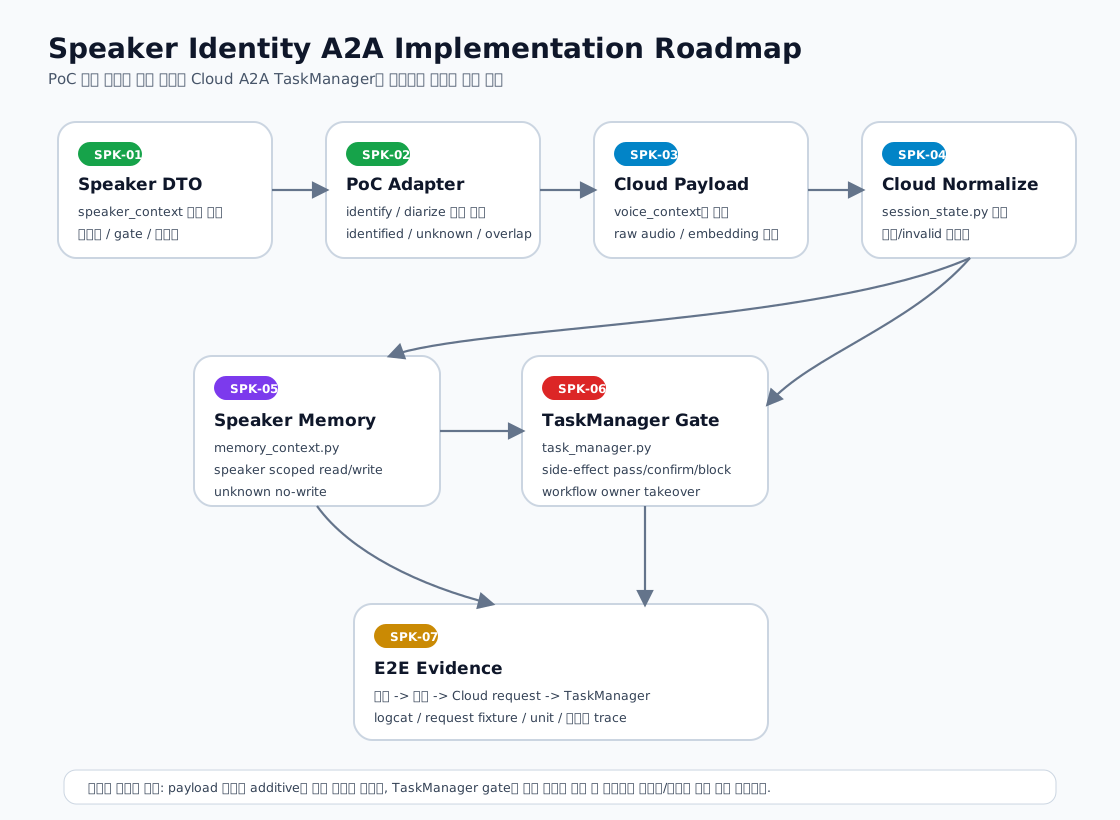
1. 구현 원칙
| 원칙 | 설명 |
|---|---|
| additive contract | 기존 voice_context를 깨지 않고 speaker_context를 추가한다. |
| on-device authority | 화자 판정은 온디바이스가 수행하고 Cloud는 결과를 evidence로만 사용한다. |
| safety before personalization | unknown, overlap, multi-speaker 상태에서는 개인화보다 재시도/차단을 우선한다. |
| raw voice local-only | 일반 실행 audio와 등록 WAV는 기기 밖으로 보내지 않는다. |
| reference sync | Voice ID + Reference Embedding은 등록 시 Cloud Registry에 동기화한다. |
| local matching | Query/Reference 대조와 confidence/policy 판정은 On-device가 수행한다. |
| evidence-first rollout | 각 단계는 payload/log/unit/E2E evidence가 있어야 다음 단계로 넘어간다. |
2. 구현 티켓 분해
| 티켓 | 영역 | 목표 | 주요 파일 | 완료 증거 |
|---|---|---|---|---|
SPK-00 |
On-device | 불투명 Voice ID와 local template repository | 신규 generator/repository | nickname-independent ID와 재부팅 후 load 확인 |
SPK-01 |
On-device | speaker context DTO 정의 | 신규 DTO 파일 또는 ForegroundService 인접 모델 |
unit 또는 log에서 기본값/상태값 확인 |
SPK-02 |
On-device | PoC 결과를 speaker context로 변환 | ForegroundService.kt, SpeakerIdentificationEngine.kt, DiarizationEngine.kt |
결과가 speaker_state, voice_id, confidence로 변환 |
SPK-03 |
On-device -> Cloud | Cloud request voice_context에 speaker context 삽입 |
Cloud LLM request 생성부, ForegroundService.kt |
request log에 voice_context.speaker_context 포함 |
SPK-04 |
Cloud A2A | speaker context 정규화 | gemini/a2a/runtime/session_state.py |
unit test에서 누락/invalid/default 처리 확인 |
SPK-05 |
Cloud Memory | speaker-scoped memory update | gemini/a2a/runtime/memory_context.py |
speaker별 read/write 분리, unknown no-write 확인 |
SPK-06 |
Cloud TaskManager | side-effect gate와 workflow owner 정책 | gemini/a2a/runtime/task_manager.py, workflow_state.py |
unknown/multi/overlap block, 동일 speaker continuation 확인 |
SPK-07 |
Identity Service | Voice ID/Reference Embedding sync/delete/resolve와 Person link | Voice Sync Registry + Profile API/DB | synced/deleted와 lookup fallback |
SPK-08 |
On-device/Cloud | Voice Profile Sync Outbox | local outbox + sync API | offline 재전송에 raw voice가 없고 동일 embedding payload 사용 |
SPK-09 |
QA/E2E | 실기기 evidence 수집 | logcat, Cloud request/response log | 등록->ID 발급->조회->TaskManager 전체 trace |
SPK-07은 단순 문서 작업이 아니라 제품 architecture 결정이다. Voice ID를 계정/얼굴 ID에 직접 붙이는 방식과 Person Profile link 방식은 이후 DB, 앱 UI, 개인정보 동의, Cloud payload가 모두 달라진다.
3. 온디바이스 구현 상세
3.1 SPK-01: SpeakerContext DTO
권장 Kotlin 모델:
data class SpeakerContext(
    val contractVersion: String = "speaker-context-v2",
    val voiceId: String = "",
    val speakerConfidence: Float = 0f,
    val speakerState: SpeakerState = SpeakerState.UNKNOWN,
    val speakerCount: Int = 0,
    val overlapRatio: Float = 0f,
    val unknownRatio: Float = 0f,
    val maxScore: Float = 0f,
    val modelVersion: String = "",
    val profileVersion: Int = 0,
    val source: String = "ondevice_sherpa_cpu"
)
권장 상태:
identified
unknown
ambiguous
multi_speaker
overlap
far_speech
disabled
주의:
voiceId는 OnDevice가 발급한 불투명 ID이며 nickname과 독립적이어야 한다.- 표시명, 사람 ID, 개인화 동의, 권한은 Cloud lookup 결과이므로 이 DTO에 넣지 않는다.
contractVersion은 Cloud 정규화에서 필수 확인해야 한다.
3.2 SPK-02: PoC 결과 변환 Adapter
현재 근거:
ForegroundService.kt
- speakerEnrollmentBufferLock
- pendingSpeakerPrefix
- lastIdentifiedSpeakerName
- idAcceptThreshold = 0.50f
- extensionFeatures.enableSpeakerStability = true

SpeakerIdentificationEngine.kt
- registerSpeakerFromWavPath()
- identifyFromSamples()
- identifyFromSegment()
- searchEmbeddingWithScoreRaw()

DiarizationEngine.kt
- diarize(samples)
- DiarizationSegment(startSec, endSec, speakerId)

SpeakerStabilityFeature.kt
- sessionBoostScore = 0.04f
- recentBoostScore = 0.02f
- sessionDecayMs = 20_000L
변환 규칙:
| 입력 | 변환 |
|---|---|
| accepted identification | speaker_state=identified, safety_gate=pass, personalization_allowed=true |
| score below threshold | speaker_state=unknown, safety_gate=reprompt |
| multiple diarization speakers | speaker_state=multi_speaker, safety_gate=block 또는 reprompt |
| overlap high | speaker_state=overlap, safety_gate=reprompt |
| distance prompt | speaker_state=far_speech, safety_gate=reprompt |
3.3 SPK-03: Cloud Request 삽입
삽입 위치는 Cloud LLM request를 구성하는 경로다.
원칙:
- 기존
recognized_text,asr_confidence,audio_locale,memory_context,device_context를 유지한다. voice_context.speaker_context를 새 field로 추가한다.- log에는 raw audio, embedding, WAV path를 남기지 않는다.
요청 예시:
{
  "recognized_text": "거실 청정하고 10분 뒤에 돌아와",
  "voice_context": {
    "recognized_text": "거실 청정하고 10분 뒤에 돌아와",
    "asr_confidence": 0.94,
    "audio_locale": "ko-KR",
    "speaker_context": {
      "contract_version": "speaker-context-v2",
      "voice_id": "vp_opaque_uuid",
      "speaker_confidence": 0.72,
      "speaker_state": "identified",
      "speaker_count": 1,
      "overlap_ratio": 0.0,
      "unknown_ratio": 0.0,
      "max_score": 0.72,
      "model_version": "speaker-model-version",
      "profile_version": 1,
      "source": "ondevice_sherpa_cpu"
    }
  }
}
4. Cloud A2A 구현 상세
4.1 SPK-04: normalize_voice_context() 확장
현재 근거:
gemini/a2a/runtime/session_state.py
normalize_voice_context()
현재 기본화:
recognized_text
asr_confidence
audio_locale
slot_state
handoff_chain
replan_reason
selected_flow_id
owner_selection
추가 권장:
def _normalize_speaker_context(value):
    speaker = value if isinstance(value, dict) else {}
    return {
        "contract_version": str(speaker.get("contract_version") or "speaker-context-v2"),
        "voice_id": str(speaker.get("voice_id") or ""),
        "speaker_confidence": _safe_float(speaker.get("speaker_confidence"), 0.0),
        "speaker_state": _allowed_state(speaker.get("speaker_state")),
        "speaker_count": _safe_int(speaker.get("speaker_count"), 0),
        "overlap_ratio": _safe_float(speaker.get("overlap_ratio"), 0.0),
        "unknown_ratio": _safe_float(speaker.get("unknown_ratio"), 0.0),
        "max_score": _safe_float(speaker.get("max_score"), 0.0),
        "model_version": str(speaker.get("model_version") or ""),
        "profile_version": _safe_int(speaker.get("profile_version"), 0),
        "source": str(speaker.get("source") or "unknown"),
    }
Cloud는 값이 없으면 unknown으로 낮춰야 한다. 값이 없다고 제품 경로를 실패시키면 기존 기능 회귀가 생긴다.
Identity 확장 필드는 기기 요청을 신뢰하지 않고 Voice ID lookup 결과로 별도 생성한다.
| 필드 | 기본값 | 설명 |
|---|---|---|
person_id |
lookup miss 시 "" |
없으면 장기 개인화/민감 정보 접근 금지 |
identity_link_state |
Cloud DB 상태 | linked/verified만 민감 정보 접근 후보 |
consent_scope |
Cloud Profile 값 | domain별 동의 없으면 false로 취급 |
authority_level |
Cloud 정책 결과 | Voice ID 자체로 권한을 부여하지 않음 |
4.2 SPK-05: Speaker-scoped Memory
현재 근거:
gemini/a2a/runtime/memory_context.py
normalize_memory_context()
build_memory_update()
추가 권장:
{
  "write_candidates": {
    "short_term_pair": {
      "person_id": "person_001",
      "speaker_state": "identified",
      "write_policy": "speaker_scoped",
      "user_text": "...",
      "assistant_text": "...",
      "route_family": "ODL",
      "workflow_id": "wf_001"
    },
    "profile_candidates": []
  }
}
정책:
| speaker 상태 | memory read | memory write |
|---|---|---|
| identified + Cloud lookup/consent allowed | person scoped read | person scoped write |
| identified + restricted | limited read | no profile write |
| unknown | anonymous/session read only | no write |
| ambiguous | no personal read | no write |
| multi_speaker/overlap | no personal read | no write |
4.3 SPK-06: TaskManager Side-effect Gate
현재 근거:
gemini/a2a/runtime/task_manager.py
build_device_task_requests()
execute_task_plan()
적용 위치:
- device task request를 만들기 전 speaker safety를 확인한다.
- side-effect가 큰 기능은
safety_gate=pass가 아니면confirmation_required또는blocked로 낮춘다. - active workflow가 있을 때 Cloud가 확인한
workflow_owner_person_id와 현재person_id가 다르면 takeover 정책을 적용한다.
정책 예시:
| 기능 | identified | unknown | multi/overlap |
|---|---|---|---|
| 단순 질의 | 허용 | 허용 | 제한적 허용 |
| 화면 조회 | 허용 | 허용 | 허용 가능 |
| 이동/청정/스케줄 | 허용 | 확인 질문 | 차단 또는 재시도 |
| 보안/개인정보 | 권한 확인 후 허용 | 차단 | 차단 |
| active workflow continuation | owner 동일 시 허용 | 확인 질문 | 차단 |
5. 권장 구현 순서
Phase 1: OnDevice Voice ID generator와 local repository 구현
Phase 2: 5세트 등록 controller와 Voice ID/Reference Embedding Sync Outbox 구현
Phase 3: Cloud Voice Sync Registry, delete/resolve와 Person mapping 구현
Phase 4: Cloud request에 speaker_context-v2 추가
Phase 5: Cloud에서 person_context를 만들고 memory scope 적용
Phase 6: TaskManager side-effect gate 적용
Phase 7: 실기기 E2E evidence 수집
Phase 8: threshold tuning과 privacy/delete 정책 확정
이 순서를 지키는 이유는 rollback 위험을 줄이기 위해서다. Cloud가 speaker_context를 아직 사용하지 않더라도 payload에 추가하는 것은 additive change다. 반대로 TaskManager gate를 먼저 넣으면 기존 기능 실행이 막히는 회귀가 생길 수 있다.
6. 테스트 매트릭스
| 케이스 | 입력 상태 | 기대 결과 |
|---|---|---|
| 등록 화자 단독 발화 | identified, confidence high |
개인화/TaskManager 실행 가능 |
| 미등록 화자 | unknown |
일반 질의 가능, side-effect는 확인 질문 |
| 동시 발화 | overlap |
재시도 안내, memory write 금지 |
| 3명 이상 | multi_speaker |
실행 차단 또는 재시도 |
| 동일 workflow 후속 발화 | same Cloud person_id |
workflow continuation 허용 |
| 다른 화자 takeover | different Cloud person_id |
takeover 확인 질문 |
| 아이/게스트 권한 | Cloud authority restricted | 보안/개인정보/스케줄 제한 |
7. 릴리즈 게이트
| 게이트 | 통과 기준 |
|---|---|
| Contract gate | request/response fixture에 speaker_context가 포함되고 backward compatible |
| On-device gate | 등록/인식/unknown/multi 상태가 DTO로 변환됨 |
| Cloud gate | speaker_context 누락/invalid/default unit test 통과 |
| Memory gate | Cloud person_id별 memory가 섞이지 않음 |
| Task gate | side-effect 기능이 speaker safety에 따라 pass/confirm/block 분기 |
| Identity gate | Voice ID가 Account/Face ID와 직접 1:1 강제 결합되지 않고 Person Profile link로 관리됨 |
| Privacy gate | raw audio Cloud 미전송, Reference Embedding 목적 제한·암호화·삭제, Query Embedding 비저장 확인 |
| E2E gate | 실제 디바이스에서 trace log 확보 |
8. 후속 의사결정
아래 항목은 구현 전에 소유자 합의가 필요하다.
| 항목 | 선택지 | 권장 |
|---|---|---|
| Voice ID 생성 | 이름 기반, UUID 기반, 계정 기반 | OnDevice UUID 기반 stable id |
| embedding 저장 | plain file, encrypted file, TEE/keystore 연계 | 최소 encrypted file |
| Cloud 등록 동기화 | Voice ID만, Voice ID + Reference Embedding | Voice ID + Reference Embedding |
| Cloud runtime lookup | Voice ID only, Voice ID + Query Embedding | PPT 호환은 둘 다 수신하되 lookup key는 Voice ID, Query Embedding 비저장 |
| unknown side-effect | 허용, 확인 질문, 차단 | 이동/청정은 확인 질문, 보안/개인정보는 차단 |
| multi-speaker | 최우수 점수 선택, 재시도, 사용자 선택 | 재시도 우선 |
| memory write | 항상 write, identified만 write, user opt-in | identified + consent only |