DeviceAgent Long-Running Observer And Proactive Agent
이 문서는 DeviceAgent와 TaskManager가 이미 보유하거나 발행하는 상태 정보를 바탕으로, 장시간 관찰 Agent와 선반응형 proactive 동작을 어떻게 설계할 수 있는지 정리한다.
핵심 결론은 단순하다. DeviceAgent가 모든 판단을 직접 하도록 만들면 rule-based 로직이 커진다. DeviceAgent는 사실 상태와 이벤트를 안정적으로 수집/노출하고, Cloud A2A 또는 상위 decision layer가 상태 변화, 실패 reason, 사용자 맥락을 보고 replan/propose/cancel/continue를 결정하는 구조가 맞다.
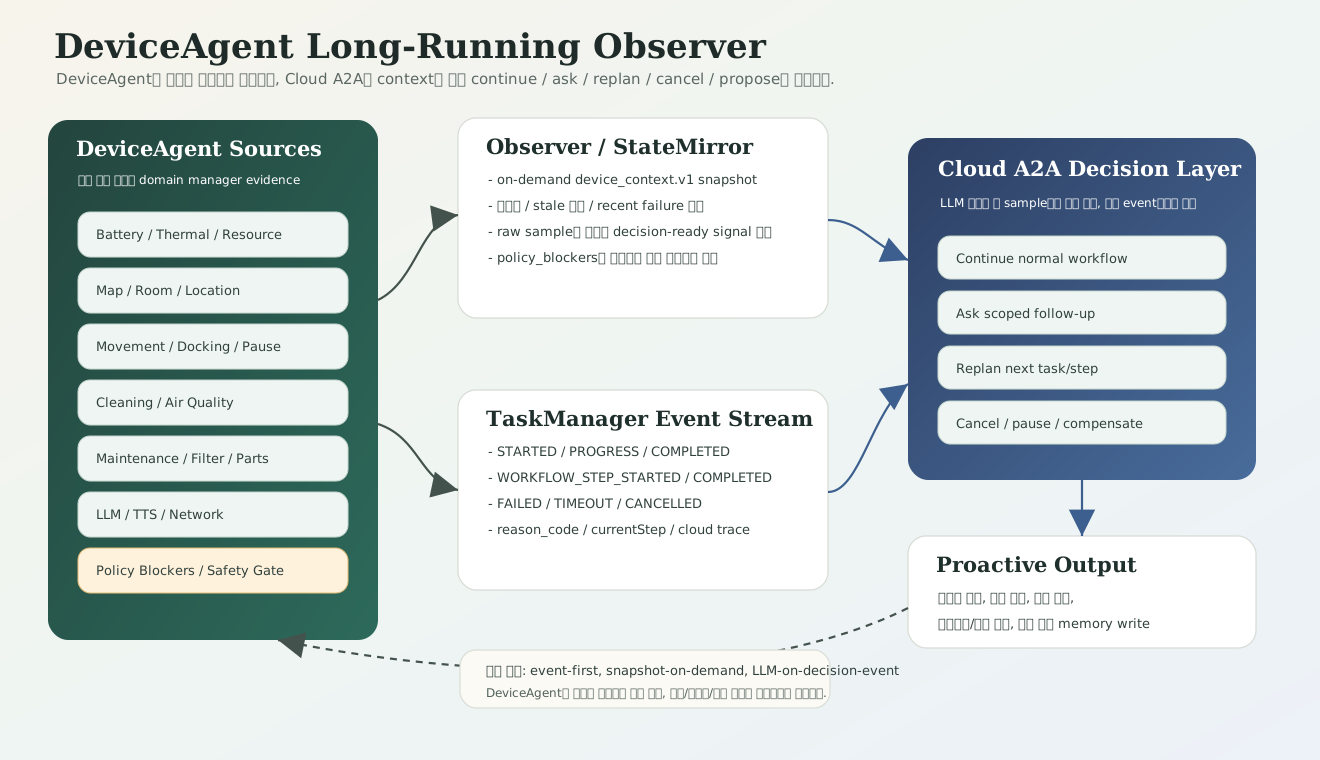
1. 한 줄 요약
DeviceAgent는 이미 main_state, battery, map/room, location, cleaning, movement, TaskManager queue, capability를 device_context.v1 snapshot으로 만들 수 있고, TaskManager는 workflow/task event를 발행한다. 이 둘을 연결하면 명시 발화 없이도 “관찰 -> 이상/기회 감지 -> 안전조건 확인 -> 제안 또는 자동 실행 -> 결과 관찰” 루프를 만들 수 있다.
2. 현재 코드에서 이미 관찰 가능한 정보
| 관찰 축 | 현재 source | 포함 정보 | Agent 활용 |
|---|---|---|---|
| Planning context | DevicePlanningContextProvider.snapshot(...) |
schema_version, snapshot_ts, main_state, battery, map, location, cleaning, movement, task_manager, capabilities |
Cloud planner가 실행 전 현재 기기 상태를 읽는 기본 context |
| Task lifecycle | TaskManager, TaskMonitorReporter |
taskId, taskMethod, state, queue, progress, currentStepIndex, workflowName, reason, requiresCloudDecision |
복합명령 진행상태 설명, 실패 시 replan/cancel/continue 판단 |
| 공간/맵 | MapManager 기반 room snapshot |
room id/name/x/y/theta, station room 여부, map editing 여부 | “어느 방을 대상으로 할 수 있는가”, “목표 공간이 안정적인가” 판단 |
| 위치/이동 | MovingController, RobotMovementController |
on-station, moving status, paused, returning/docking, current position | 이동 가능성, 큐잉 필요성, 복귀/중단 판단 |
| 청정 상태 | CleaningTransaction, BaseCleaningManager |
청정 running/paused, last action, area info, AQ mode, wind type, auto AQ | 새 청정 명령 병합, 청정 완료 후 다음 step 판단 |
| 실내 공기질 | AirQualityManager |
PM10, PM2.5, PM1.0, TVOC, NOx, HCHO, CO2, temperature, humidity, integrated AQ | 공기질 악화 감지, 특정 공간 청정 제안/자동 실행 |
| 실외 공기질/날씨 | OutdoorAirQuality, Information |
outdoor PM, temperature, humidity, weather, locationName | 외부 공기질 연동 청정, 날씨 기반 안내 |
| 배터리/열/리소스 | BatteryManager, SocHeatManager, TaskResourceMonitor |
capacity, low battery, battery efficiency, CPU temperature, thermal/cpu/ram pressure snapshot | 긴 workflow admission, 충전 권고, 고부하 시 작업 지연 |
| 정비/소모품 | FilterBodyManager, DeviceUsageManager, PartReplacementManager |
filter status/capacity/replacement, battery/LCD/fan/motor/lidar/camera/mic/speaker 사용량/교체일 | 필터/부품 교체 제안, 성능 저하 원인 설명 |
| LLM/음성 상태 | LlmManager, setLlmStatus, getLlmStatus |
STT/Cloud LLM/on-device LLM/TTS/ready/idle 상태 | LLM busy와 TaskManager 실행권 handoff, 음성 개입 타이밍 판단 |
| 네트워크/클라우드 연결 | getAwsConnect, Wi-Fi status/RSSI/band |
AWS/MQTT 연결 캐시, Wi-Fi 품질, 2.4G/5G count | Cloud fallback/on-device 우선순위, 전송 실패 원인 분리 |
| 설정/정책 상태 | Settings, CmdPolicyManager, StateManager |
home lock, night mode, privacy mode, setup wizard, upgrade, self-test, vital sign | 실행 차단 reason, 사용자 안내, 안전 우선순위 |
3. Observer와 Planner의 책임 경계
장시간 관찰 구조에서 가장 중요한 경계는 “사실 수집”과 “판단”을 분리하는 것이다.
| 계층 | 책임 | 하지 말아야 할 것 |
|---|---|---|
| DeviceAgent Observer | 현재 상태, 변화량, task event, policy blocker, reason을 구조화해서 노출 | 사용자 의도와 장기 목표를 임의로 추론하지 않음 |
| TaskManager | task/workflow queue, priority, timeout, cancel, completion target, event lifecycle 관리 | Cloud planner의 의미 판단을 복제하지 않음 |
| On-device Bridge | Cloud 응답을 DeviceAgent TaskManager 계약으로 변환하고 event를 relay | 실패를 임의로 성공 처리하거나 policy를 우회하지 않음 |
| Cloud A2A / Decision layer | 여러 context와 사용자 맥락을 보고 continue, ask, replan, cancel, propose 결정 |
물리 실행 safety gate를 직접 우회하지 않음 |
이 경계를 지켜야 rule-based 자동화가 커지지 않는다. 예를 들어 “공기질이 나쁘다”는 DeviceAgent가 제공할 수 있는 사실이고, “사용자에게 먼저 물어볼지 바로 청정할지”는 선호도, 시간대, 최근 대화, 안전정책, 소음/야간모드까지 포함해 상위 Agent가 결정해야 한다.
4. 장시간 관찰 Agent가 볼 수 있는 선반응 시나리오
4.1 복합명령 실행 중 재계획
사용자: 공간1 갔다가 공간2 청정하고 복귀해
Cloud A2A: submitWorkflow 생성
TaskManager: 공간1 이동 -> 청정 -> 공간2 이동
DeviceAgent: 공간2 이동 실패 event + reason_code 발행
Cloud A2A: reason/context 확인 후 replan
결과: 공간2 재시도, 다른 공간 먼저 처리, 사용자 확인, 또는 복귀
Cloud는 모든 progress event마다 LLM 판단을 다시 하지 않는다. FAILED, TIMEOUT, CANCELLED, requiresCloudDecision=true처럼 판단이 필요한 event만 replan 후보로 본다.
4.2 공기질 악화 기반 proactive clean
Observer: 거실 PM2.5/CO2/HCHO가 일정 시간 이상 나쁨
DeviceAgent: 현재 on-station, 배터리 충분, night mode off, home lock off
Cloud A2A: 최근 사용자 선호와 시간대 확인
응답: "거실 공기질이 나빠졌어요. 지금 거실 청정을 시작할까요?"
또는 정책상 허용된 경우: submitWorkflow(clean_living_room)
현재 코드에는 airSensorDetected와 setOutdoorAirQualityLinkedClean 계열의 기반이 있다. 장기적으로는 단순 threshold가 아니라 변화량, 지속시간, 사용자 반응 이력까지 보고 선반응 강도를 조절해야 한다.
4.3 작업 상태 설명
사용자: 지금 뭐 하고 있어?
On-device/Cloud: getDevicePlanningContext 또는 getQueueStatus 조회
응답: "공간1 청정은 끝났고, 지금 공간2로 이동 중이에요."
이 흐름은 LLM이 새로 상상해서 답하면 안 된다. TaskManager currentStepIndex, currentStepMethod, workflowName, stage, message가 사실 근거다.
4.4 안전/정책 선차단
사용자: 안방으로 가서 청정해
Observer: battery low 또는 home lock/night mode/privacy mode
TaskManager/DeviceAgent: policy not allowed
Cloud A2A: reason을 사용자 언어로 변환
응답: "지금은 배터리가 부족해서 이동 청정은 어렵고, 먼저 스테이션으로 복귀할게요."
최근 실기기에서 본 MOVE_POLICY_NOT_ALLOWED도 같은 계열이다. LLM 계획이 끝났더라도 DeviceAgent policy가 LLM busy를 보고 이동을 막으면 TaskManager가 실패한다. 따라서 Cloud LLM planning과 TaskManager physical execution 사이에는 명확한 execution lease handoff가 필요하다.
4.5 정비/소모품 Agent
Observer: filter capacity 감소 + 청정 시간 증가 + 공기질 개선 속도 저하
Cloud A2A: 정비 제안 생성
응답: "필터 잔여량이 낮고 최근 청정 시간이 길어졌어요. 필터 상태를 확인해볼까요?"
이 기능은 즉시 자동 실행보다 사용자 확인형 proactive가 적합하다. 정비/소모품은 물리 이동보다 위험은 낮지만, 사용자가 방해로 느낄 가능성이 높기 때문이다.
4.6 네트워크/Cloud 품질 Agent
Observer: AWS connect false 반복 + Wi-Fi RSSI 낮음
Cloud/On-device: Cloud 호출 실패 원인을 routing 문제가 아니라 network issue로 분리
응답: "현재 네트워크가 불안정해서 로컬에서 가능한 명령만 처리할게요."
DeviceAgent의 getAwsConnect는 live probe가 아니라 IotAgent가 써주는 캐시다. 따라서 이 값은 “현재 클라우드 연결 판단 evidence”로 쓰되, 단독 절대 진실로 쓰면 안 된다.
5. 필요한 데이터 계약 확장
현재 device_context.v1은 최소 실행 context다. 장시간 관찰 Agent로 확장하려면 아래 필드를 단계적으로 추가하는 것이 좋다.
| 확장 영역 | 추가 권장 필드 | 이유 |
|---|---|---|
| air_quality | current values, level, area snapshot, trend, stale 여부 | proactive clean과 환경 설명 |
| policy_blockers | home_lock, night_mode, privacy_mode, llm_busy, map_editing, low_battery, upgrade/selftest | 실행 불가 이유를 자연어로 설명 |
| network | aws_connect_cached, wifi_rssi, wifi_band, last_cloud_error | Cloud/on-device fallback 판단 |
| maintenance | filter capacity, remaining time, replacement dates, part usage counters | 정비 Agent와 제품 health 설명 |
| recent_task_events | last N terminal events, recent failures by method/area | 반복 실패 감지와 replan 품질 개선 |
| resource | cpu, ram pressure, thermal level, source, updated_at | resource-aware task admission |
| preference_summary | user approved/denied proactive suggestions, quiet hours | 선반응 강도 조절 |
우선순위는 policy_blockers -> recent_task_events -> air_quality -> network -> maintenance -> resource -> preference_summary 순서가 현실적이다.
6. Event 중심 운영 원칙
장시간 관찰은 polling만으로 만들면 비효율적이고 noisy하다. 기본 원칙은 event-first다.
| 데이터 유형 | 수집 방식 | Cloud로 올리는 기준 |
|---|---|---|
| Task lifecycle | event push | 모든 workflow event, terminal failure, requiresCloudDecision=true |
| Heartbeat | 주기 push | 장치 살아있음, room 목록, 최소 health |
| Device context | on-demand snapshot | plan 전, failure 후, 사용자 상태 질문 시 |
| Air quality | 변화량/threshold event + 필요 시 snapshot | 지속 악화, 급변, 사용자 선호 조건 만족 |
| Maintenance | 저빈도 snapshot 또는 threshold event | 잔량/사용량 임계치, 교체일 경과 |
| Network | 상태 변화 event | connected/disconnected, RSSI 급락, Cloud error 반복 |
즉 Cloud는 모든 raw sample을 매번 LLM에 넣지 않는다. DeviceAgent/Observer는 요약 가능한 signal로 줄이고, Cloud는 decision이 필요한 순간에만 풍부한 snapshot을 요청한다.
7. Product 기획 관점 이점
| 이점 | 설명 |
|---|---|
| 사용자가 묻기 전에 상태를 이해 | 공기질, 배터리, 실행 중 task, 실패 reason을 이미 알고 있어 응답이 구체적이다. |
| 복합명령이 장시간 작업이 된다 | “갔다가 청정하고 복귀”를 단일 응답이 아니라 관찰 가능한 workflow로 운영한다. |
| 실패가 대화로 회복된다 | 실패 event와 reason을 바탕으로 “다시 시도/다른 방/복귀/사용자 확인”을 선택할 수 있다. |
| 기존 DeviceAgent 안전정책을 보존 | TaskManager가 기존 domain manager와 policy를 감싸므로 안전조건을 우회하지 않는다. |
| Cloud/로컬 역할이 분명해진다 | DeviceAgent는 사실과 실행, Cloud는 의미 판단과 재계획을 담당한다. |
| 장기적으로 로보틱스 brain 구조로 확장 | reactive voice command와 proactive signal-driven action이 같은 context/event 기반으로 연결된다. |
8. 구현 우선순위
getDevicePlanningContext에policy_blockers,llm,network,air_quality를 추가한다.- TaskManager event payload에
reason_code,requiresCloudDecision,currentStep*,cloud_* trace보존을 계속 검증한다. - On-device bridge는 event를 Cloud로 relay하되, 정상 progress는 local telemetry로 유지하고 판단 event만 replan 후보로 올린다.
- Cloud A2A는
task_event -> context refresh -> replan decision경로를 명시적으로 테스트한다. - 장기 관찰용 memory는 raw log가 아니라 “반복 실패”, “자주 쓰는 공간”, “proactive 제안 수락/거절” 같은 요약 상태만 저장한다.
9. 주의할 점
- DeviceAgent에 사용자 의도 추론을 많이 넣지 않는다.
- proactive 실행은 자동 실행보다 제안형부터 시작한다.
getAwsConnect는 캐시이므로 live network truth로 과신하지 않는다.- 공기질 threshold만으로 바로 실행하지 말고 지속시간, 사용 시간대, 정책 상태를 같이 본다.
- TaskManager failure를 무조건 Cloud LLM으로 보내지 말고, recoverable/local retry와 external decision 필요 event를 분리한다.
- 실기기에서는 platform-signed APK만 사용하고, debug cert APK를
/system/priv-app에 넣지 않는다.